Chapter 4
Using Your Motion Tablet PC
Motion Computing M1400 Tablet PC User Guide 55
USING THE
BLUETOOTH
DEVICE WIZARD
TO CONNECT A
BLUETOOTH
D
EVICE
(B
LUETOOTH
KEYBOARD
EXAMPLE)
In this section, the Bluetooth Device Wizard is used to connect and exchange
passkeys between a Bluetooth keyboard and the Tablet PC. This is a general
example only; some of the steps may be slightly different for other devices.
IMPORTANT: Follow these steps before installing any software that came with
your Bluetooth device. You may need to install application software for your
device at the end of this procedure, but do not install any new Bluetooth software
before you complete the Device Wizard.
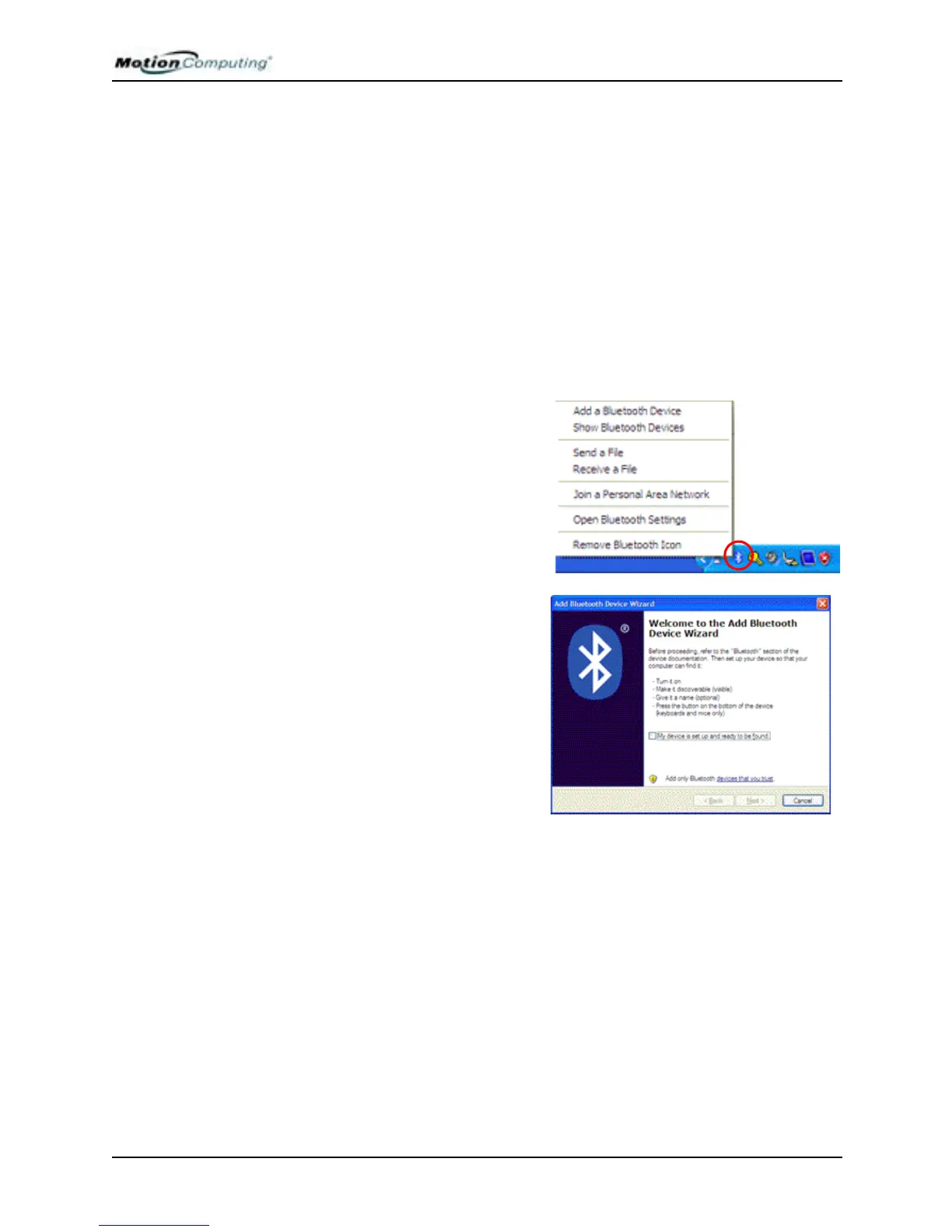
1. Start the Bluetooth application
a. Make sure that either the Bluetooth LED is flashing or that there is a
checkmark beside Enable Bluetooth Wireless radio (both indicate that Blue-
tooth is running) in the Motion Dashboard.
b. Using your pen, single tap the
Bluetooth Devices icon in the
system tray.
c. Tap Add a Bluetooth Device to
launch the Bluetooth Devices
application window.
The Add Bluetooth Device Wizard
appears.
2. Make the device discoverable
a. Before starting the Add Bluetooth Device Wizard, place the Bluetooth
device (mouse, keyboard, printer, etc.) in discoverable mode. This sends a
signal that is detected by the Bluetooth card in the Tablet PC.
NOTE: Each Bluetooth device may have a different way to make it discoverable.
Some have a small button on the back of the mouse or keyboard; others may re-
quire that you press a key sequence on the keyboard. Look at the documentation
that came with the Bluetooth device or visit the manufacturer’s website for infor-
mation.



 To Next Page