Defining a Basic AP-6511 Configuration
23
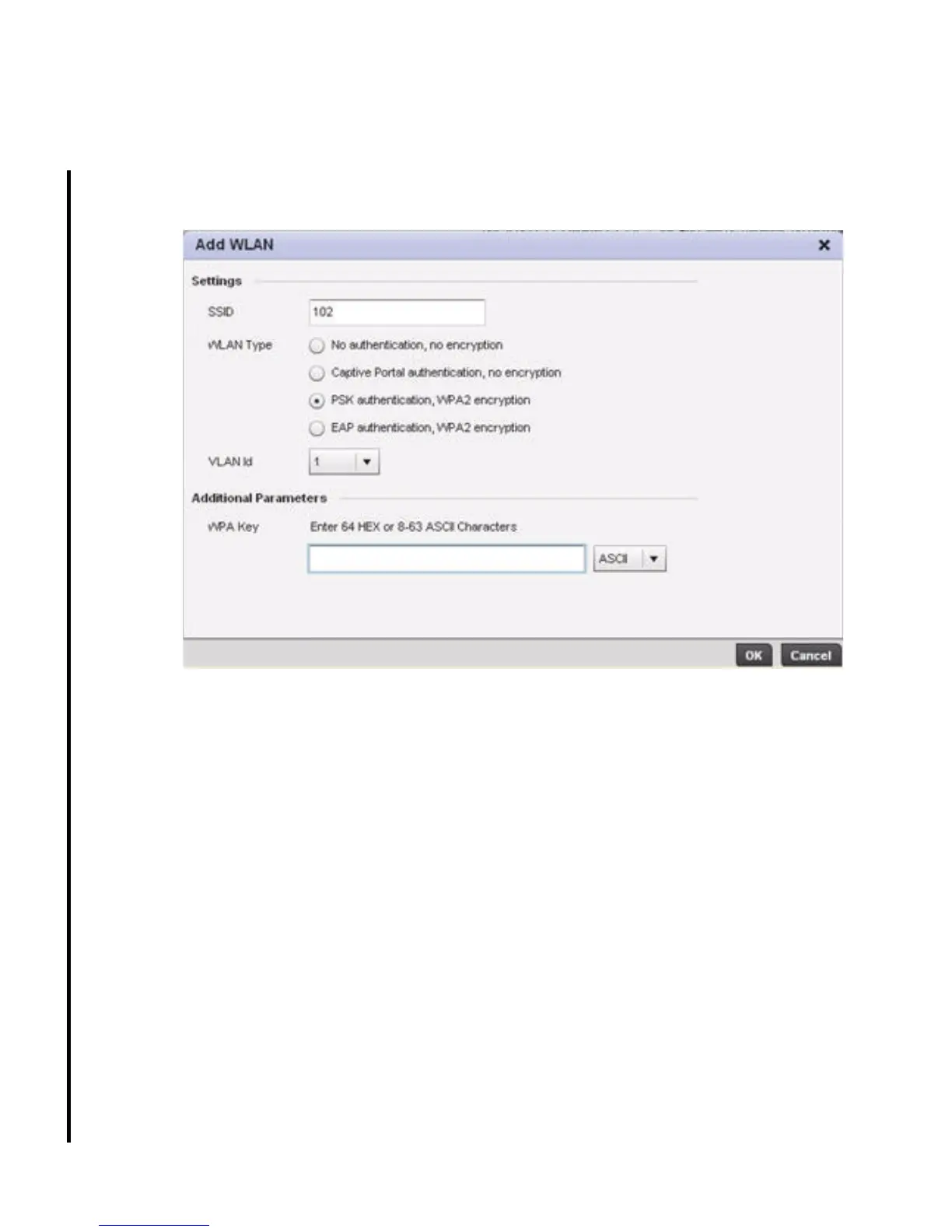
22. Use the WLAN Setup screen to set the WLAN configurations used on the AP-6511. To add
a new WLAN, select Add WLAN or select an existing WLAN to modify from those listed.
Set the following parameters for the new or modified WLAN configuration:
• SSID - Enter or modify the Services Set Identification (SSID) associated with the WLAN.
The WLAN name is auto-generated using the SSID until changed by the user. The
maximum number of characters is 32. Do not use < > | " & \ ? ,
• WLAN Type - Select either No authentication, no encryption (for an insecure WLAN),
Captive portal authentication, no encryption (for a guest WLAN), PSK authentication,
WPA2 encryption (to implement a pre shared key) or EAP authentication, WPA2
encryption (to implement an external RADIUS server).
• VLAN ID - Use the drop-down menu to select a VLAN for traffic segregation on this
WLAN. All configured VLANs are available.
• WPA Key - Enter an alphanumeric string of 8 to 63 ASCII characters or 64 HEX characters
as the primary string both transmitting and receiving authenticators must share if using
a pre shared key. The alphanumeric string allows character spaces. This passphrase
saves the administrator from entering the 256-bit key each time keys are generated.
23. Select OK to save the changes and exit. Select Next to display the RADIUS
Authentication screen.



 To Next Page
 Loading...











