35
P
R
E
L
IMI
N
A
RY
Learning to Use Your Phone
Using iTAP™ Text Entry Method
iTAP™ is a predictive text entry method that lets you enter
a word using one keypress per letter.
For example, if you press
7764
, letter
combinations that match your key presses appear:
If you want a different word, such as
progress
, continue
pressing number keys to enter the remaining characters.
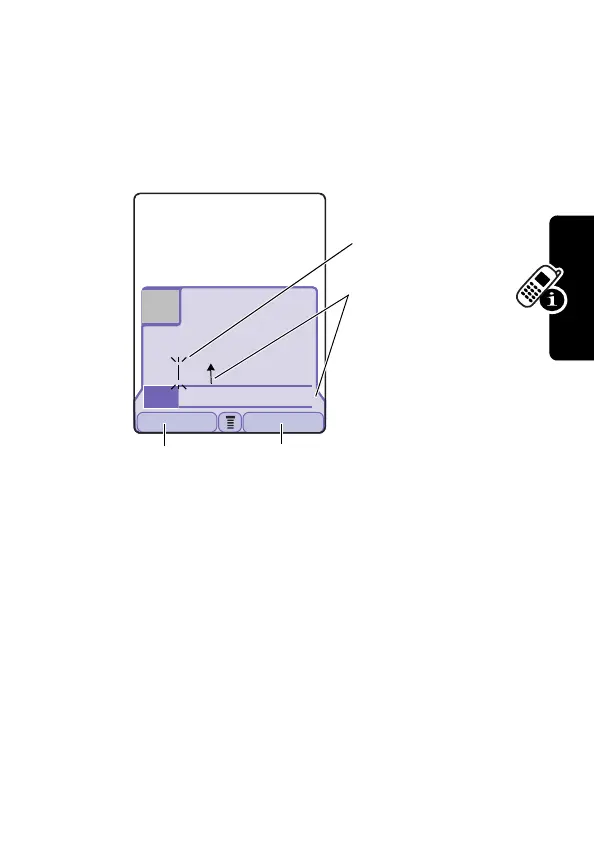
Entering Words
In a text entry screen, you can press
#
to switch entry
methods. An indicator tells you which method is active
031428o
Msg:
Prog ram
Prog Proh Spoi Proi Pro4c
DELETE SELECT
59
446
Üô
Press
SELECT
(
+
)
to insert the
highlighted word.
Press
DELETE
(
+
) to
clear the last letter
Flashing cursor
indicates insertion
point.
Press
S
up to
accept
Program
,
or right to highlight
another option.
Press
*
to enter
Prog
and a space.


 To Next Page
 Loading...