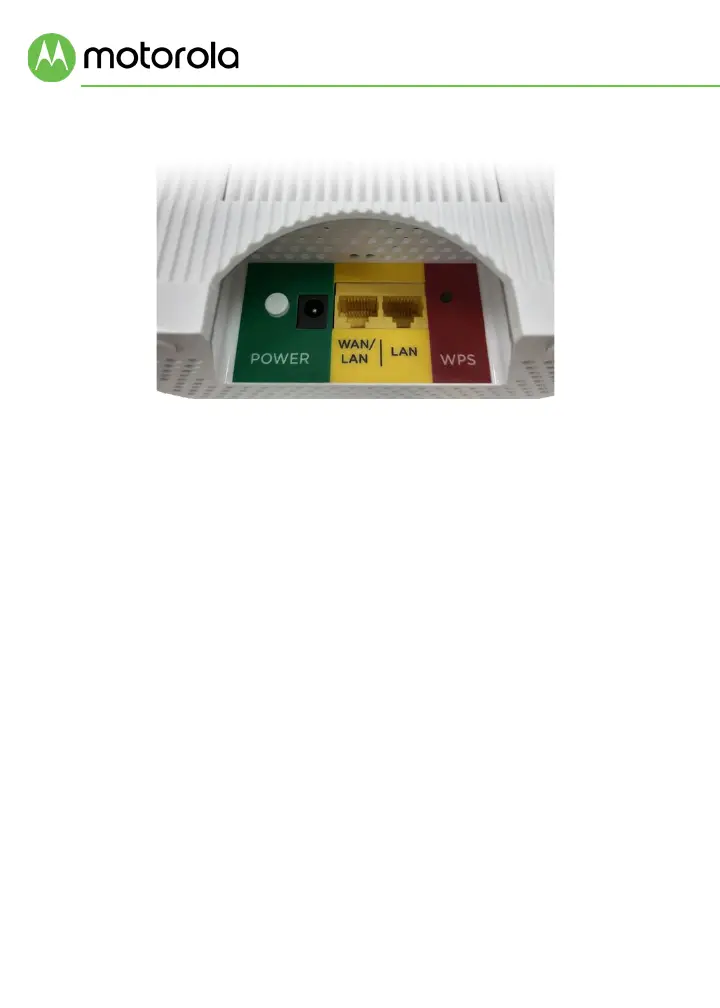
Rear Panel
ON/OFF button and POWER jack
Press the power button in until it clicks for ON. Connect the supplied
power adapter between the power jack and an electrical outlet.
WAN/LAN and LAN ports
On the Router unit, the WAN/LAN port is a WAN port. Use this port to
connect your Router to your modem’s LAN port. On the Satellite unit,
the WAN/LAN port is a LAN port. You can connect a computer, smart
TV/media player, game station, or other Ethernet-capable device to
any LAN port.
WPS button
Most users will not use the WPS button. It is not needed to set up your
WiFi. Commonly used to connect WiFi printers but not required.
RESET button
The reset button is located on the bottom of the unit. If you need to
reset your unit, press this button using a small object such as a
paperclip for 10 seconds.














 To Next Page