
 To Next Page


S
Shannon MejiaJul 30, 2025
Why doesn’t the backlight turn on my Motorola W375?
- JJohn LongJul 30, 2025
If you don’t see a backlight on your Motorola Cell Phone display during phone operation, check the backlight setting.

Why doesn’t the backlight turn on my Motorola W375?
If you don’t see a backlight on your Motorola Cell Phone display during phone operation, check the backlight setting.
Why is my Motorola W375 Cell Phone display dark and keypad unresponsive?
If your Motorola Cell Phone display is dark and the keypad isn't responding, it's possible that the keypad is automatically locked. To unlock it, press the M key followed by the * key. Alternatively, you can disable the auto keypad lock feature or adjust its timer by going to M > Settings > Security > Auto Key Lock.
Why does my Motorola W375 Cell Phone always say 'no signal' when trying to make a call?
If you see a 'no signal' message on your Motorola Cell Phone and can't make calls, ensure that the 'Band Setting' is set to Automatic.
What to do if my Motorola W375 doesn't vibrate for calls and messages?
If your Motorola Cell Phone doesn't vibrate for incoming calls or messages, it may be due to the volume being set to 0. Press the S key right or left to adjust the volume.
Why does my Motorola W375 Cell Phone screen flicker when using the camera?
If the screen flickers when taking a picture with your Motorola Cell Phone camera, try selecting an alternative frequency for the Flicker setting. For instance, if it's currently at 50Hz, switch to 60Hz and try taking the picture again.
Why can't I see the display on my Motorola Cell Phone?
If your Motorola Cell Phone display isn't visible even with a good battery, check the backlight setting.
Guide to answering, ending, holding, and muting phone calls.
Navigating phone menus, selecting options, and using text input methods.
Guidelines for protecting the phone from environmental factors like liquids and dirt.
Important information regarding safe use and radio frequency exposure.
Recommendations for safe mobile phone use while operating a vehicle.
 General
| Display type | TFT |
|---|---|
| Display diagonal | 1.8 \ |
| Display resolution | 128 x 160 pixels |
| Display number of colors | 65536 colors |
| External display resolution | 28 x 35 pixels |
| External display number of colors | Monochrome |
| Internal memory | 1.5 MB |
| Flash card support | No |
| Rear camera | Yes |
| Rear camera resolution | 640 x 480 pixels |
| Rear camera resolution (numeric) | 0.3 MP |
| Networking type | GSM |
| Operating frequency | 900/1800/1900 MHz |
| Multimedia Messaging Service (MMS) | Multimedia Messaging Service (MMS) is a standard way to send messages that include multimedia content to and from a mobile phone over a cellular network |
| Ringer type | Polyphonic |
| Product color | Black |
| Talk time (2G) | 7.5 h |
| Battery capacity | 850 mAh |
| Standby time (2G) | 250 h |
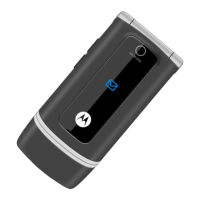
| Form factor | Clamshell |
| Data network | GPRS |
 Weight and Dimensions
| Depth | 45 mm |
|---|---|
| Width | 99 mm |
| Height | 18.6 mm |
| Weight | 88 g |