12
13
16
12
C5
C1
F
HH
C4
sound bar
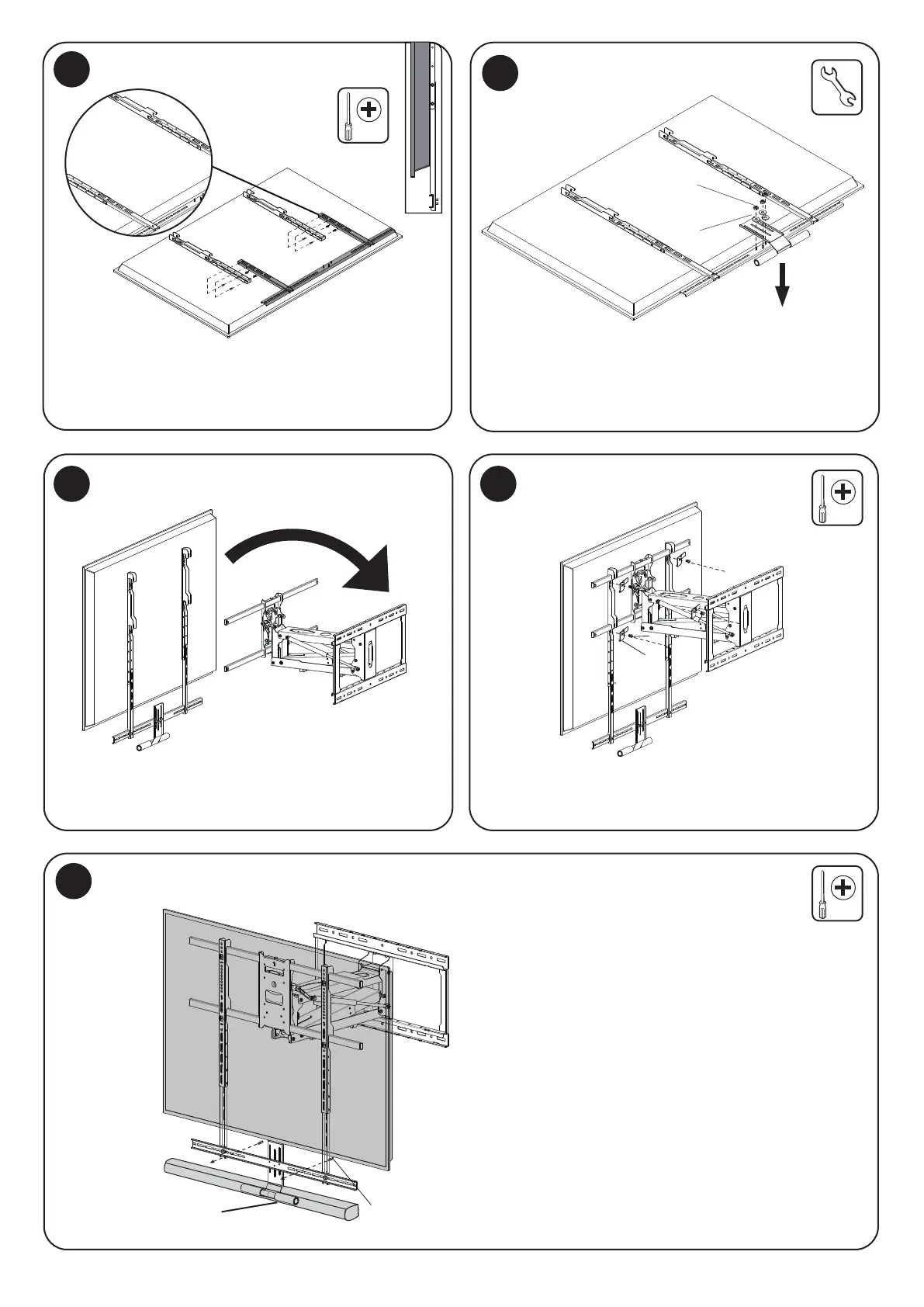
Attach the Crossbar (With Soundbar)
14
Hang the TV on the Mount Arm
Optional Soundbar Installation
15
Install the Safety Brackets
Attach the Soundbar
To connect a soundbar to the mount, attach the crossbar
so that it is below the bottom of the screen. Secure it to
the VESA Arms using the bolts (C6) and tighten them
until secure.
Hang the TV onto the horizontal supports of the mount arm,
ensuring that the 4 points of contact are all fully seated in
their hooks.
Attach the soundbar to the crossbar using the
bolts (#C4) or other bolts as identified by the user
manual of your device.
Install the Safety Brackets (#HH) using the Bolts (#F) in all
4 locations as shown here.
Attach the Soundbar to the bolts protruding from the back
of the crossbar using the Washers (#C1) and the Nuts (#C5).
Adjust the height of the handle as needed to accommodate
asoundbar or the screen.


 To Next Page