PROGRAMMING INSTRUCTIONS
1. PROGRAMMING OPEN & CLOSE LIMITS
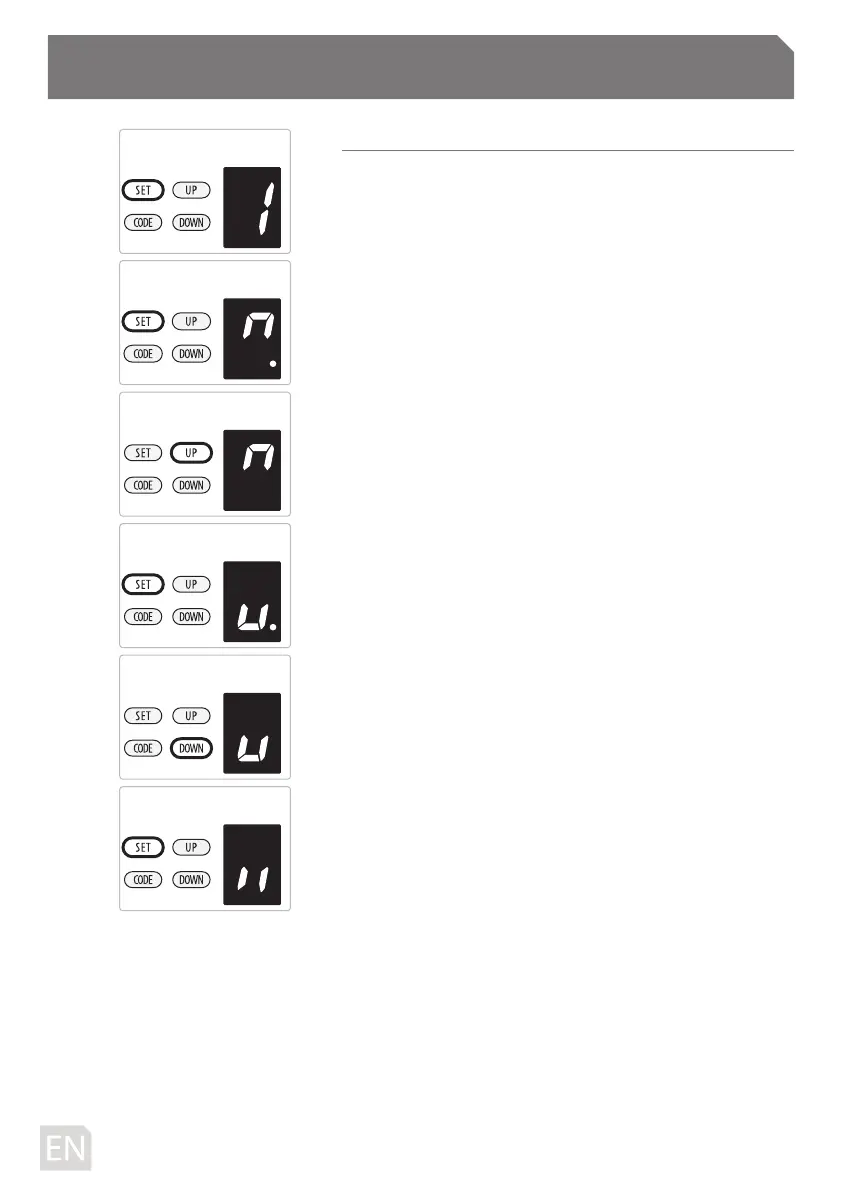
a) Press and hold SET button to enter this function setting
until “
1 ” appears on the display then release the button.
b) Press the SET button again. The door opener is now in
Programming Mode. And then you will see “n” with dot
appears on the display.
c) Press and hold the UP button until the door reaches the
desired open position, you will see “n” without dot on the
display.
d) Press SET button to conrm the open position, then you
will see “u” with dot on the display.
e) Next press and hold the DOWN button until the door
reaches the desired close position, you will see “u” without
dot on the display.
NOTE: For ne adjustments toggle UP & DOWN buttons.
f) Now press the SET button to conrm the close position,
then you will see “II” on the display.
After conrm the close position, the door will now cycle
open and close to set the travel limits and force sensitivity
adjustments. The door is now set for normal operation.
CAUTION: After the cycle open and close, there will be
gures shown on the display (0~9), “0” means the doors is
balanced, the smaller gure means the better door balance,
strongly recommend that the gure need to be smaller than
the power force.
-10D-



 To Next Page