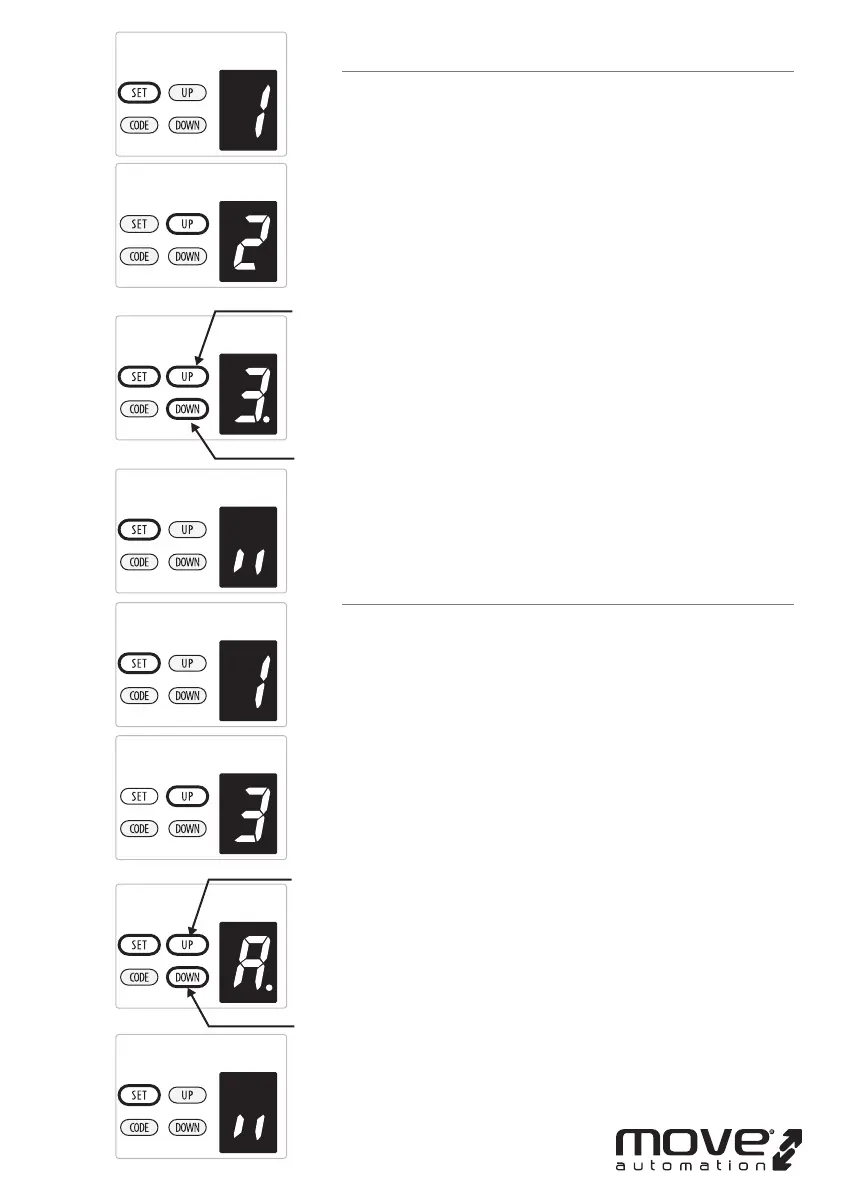
2. OBSTRUCTION FORCE ADJUSTMENT
CAUTION: The obstruction force adjustment is set
automatically during programming. Normally no
adjustment is necessary.
a) Press and hold SET Button until “
1”appears on the display,
next press the UP Button until “
2” appears on the display to
enter this function setting then release the button.
b) Press the SET button again, The unit is now in force
adjustment mode. And then you will see a gure “
3” with
ash dot appears on the display.
c) Press the UP button to increase the force setting or the
DOWN button to decrease the force setting.
The minimum force is “
1” and it can be adjusted upward. The
maximum force is “
5”.
d) Press SET button to conrm the set and it will back to
standby status automatically and display “ll”.
NOTE: The force is set on “
3” as standard in factory.
3. TRAVEL SPEED SETTING
CAUTION: If you changed the speed again, it will cancel
the previous travel limit. The speed adjustment function
will be available only after you reset the travel limit.
a) Press and hold SET Button until “
1”appears on the display,
next press the UP button until “
3” appears on the display to
enter this function setting then release the button.
b) Press the SET button again. The unit is now in speed
adjustment mode. And then you will see a letter “
A” with
ash dot appears on the display.
c) Press the UP & DOWN button to choose the speed. Figure “
8”
means the 80% of the travel speed. Figure “
A” means the full
speed.
d) Press SET button to conrm the set and it will back to
standby status automatically and display “ll”.
NOTE: The travel speed is set on full speed “
A” as standard in
factory.
-11D-
increase force
decrease force
increase speed
decrease speed



 To Next Page