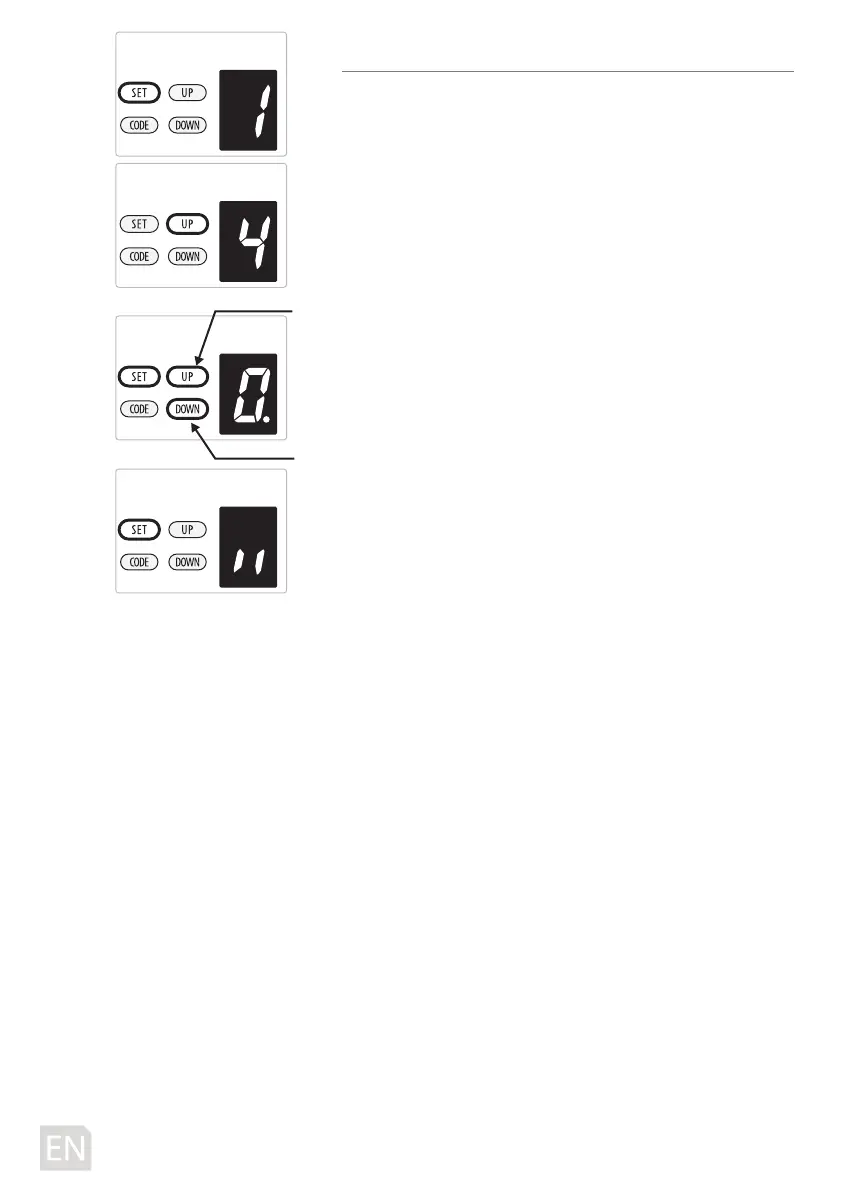
4. AUTOMATIC CLOSING & TIME SETTING
NOTE: We recommend that Safety Photo Beams be used in
any installation where the Auto Close function is enabled.
a) Press and hold SET Button until“
1”appears on the display,
next press the UP button until “
4” appears on the display to
enter this function setting then release the button.
b) Press the SET button again, the unit is now in automatic
close adjustment mode. And then you will see a gure “
0”
with ash dot appears on the display.
c) Press UP / DOWN button once to set the auto close time
(
0~9).
d) Press UP button to increase the time, or DOWN button to
decrease the time.
The close time is 15second*N, N=0~9. The maximum time is
135s. To disable Auto Close Function, set time to zero (
0).
e) Press SET button to conrm the set and it will back to
standby status automatically and display “ll”.
NOTE:
1.The closing time is set on “
0” as standard in factory.
2. If the Photo Cell Function is on, and it’s broke by the
obstruction, the auto close time will stop for a while, and
then continue the automatic close time again.
-12D-
increase time
decrease time



 To Next Page