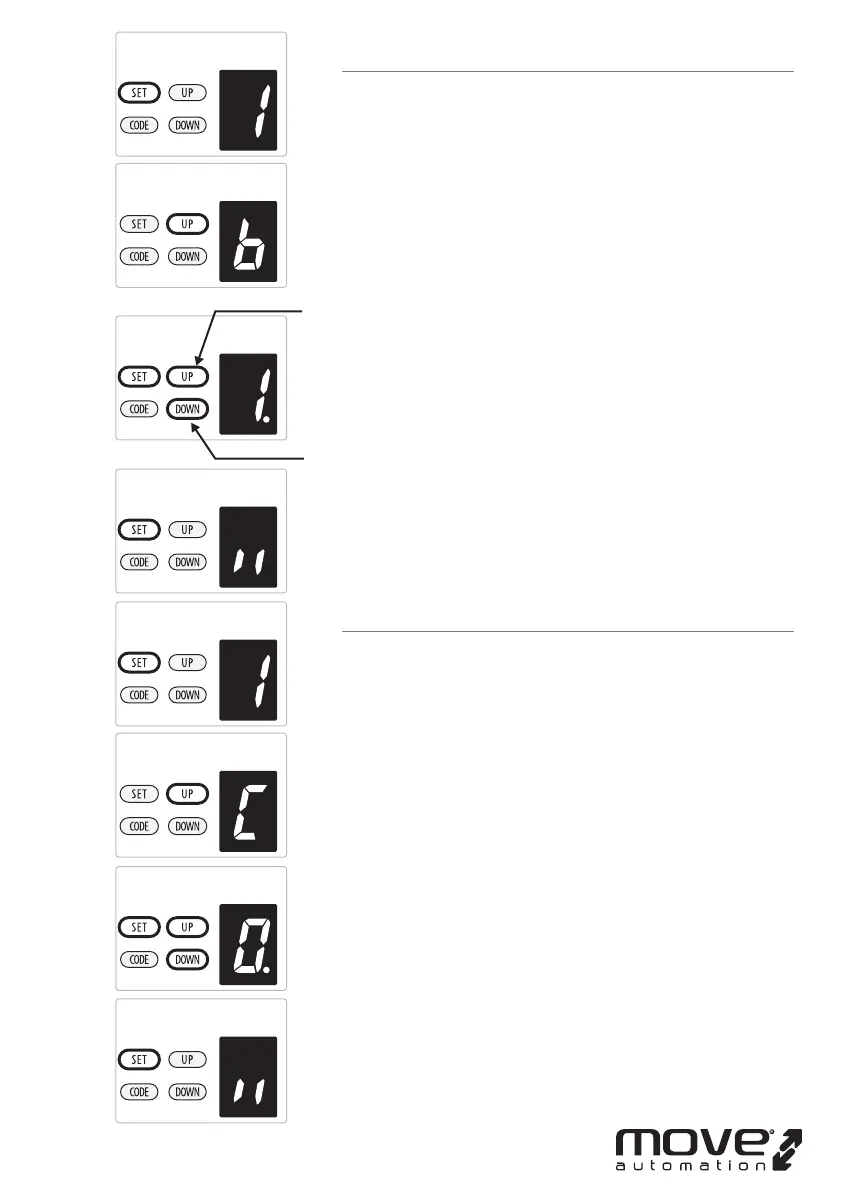
B.REVERSAL HEIGHT IGNORANCE SETTING
a) Press and hold SET Button until “
1” appears on the display,
next press the UP button until “b” appears on the display to
enter this function setting then release the button.
b) Press the SET button again. The unit is now in reversal
height ignorance adjustment mode. And then you will see a
gure “
1” with ash dot appears on the display.
c) Press UP / DOWN button once to set the reversal height
ignorance while closing (0~9).
d) Press UP button to increase , or DOWN button to decrease.
Figure “1~9” means the door will still not rebound even
though there’s obstacles in its closing path within 1cm~9cm
away from the close position. This function is most suitable
for the Northern Europe where will always snow on the
ground.
e) Press SET button to conrm the set and it will back to
standby status automatically and display “ll”.
NOTE: The reversal height is set on “
1” as standard in factory.
C. PASS DOOR SWITCH TYPE SETTING
a) Press and hold SET Button until “
1 ” appears on the display,
next press the UP button until “
C” appears on the display to
enter this function setting then release the button.
b) Press the SET button again. The unit is now in the pass door
switch type adjustment mode. And then you will see a gure
“
0” with ash dot appears on the display.
c) Press UP / DOWN button once to set the pass door switch
type. You can choose “
0” or “1” set.
Figure “
0” means, the pass door function is normally open.
Figure “
1” means, the pass door function is normally close.
e) Press SET button to conrm the set and it will back to
standby status automatically and display “ll”.
NOTE: The pass door switch is set on “
0” as standard in
factory.
-17D-
increase height
decrease height



 To Next Page