D. PHOTO CELL ON/OFF SETTING
NOTE: Make sure the photo cell has been correctly installed
and used Normally Closed contacts to the accessory
terminals of the opener.
Also note that the photo beam function must be disabled
if NO photo beams are tted, otherwise the door cannot
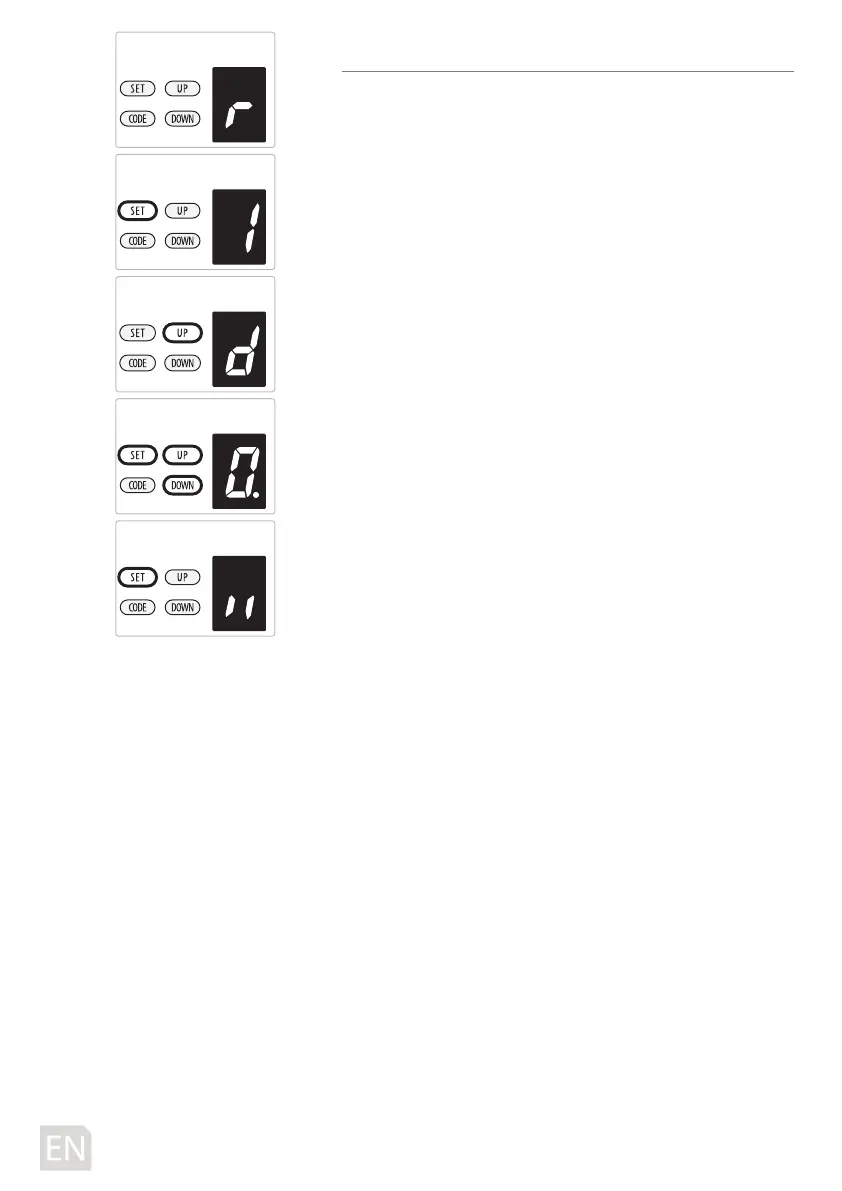
be closed, and the LED display will show the letter“ r ”as an
indication.
a) Press and hold SET Button until “
1” appears on the display,
next press the UP button until “d” appears on the display to
enter this function setting then release the button.
b) Press the SET button again. The unit is now in the photo
cell ON/OFF adjustment mode. And then you will see a
gure “
0” with ash dot appears on the display.
c) Press UP / DOWN button once to set the photo cell ON/OFF
switch. You can choose “
0” or “1”set.
Figure “
0” means, the photo cell function is closed.
Figure “
1” means, the photo cell function is open.
d) Press SET button to conrm the set and it will be back to
standby status automatically and display “ll”.
NOTE: The photo cell is set on “
0” as standard in factory.
-18D-



 To Next Page