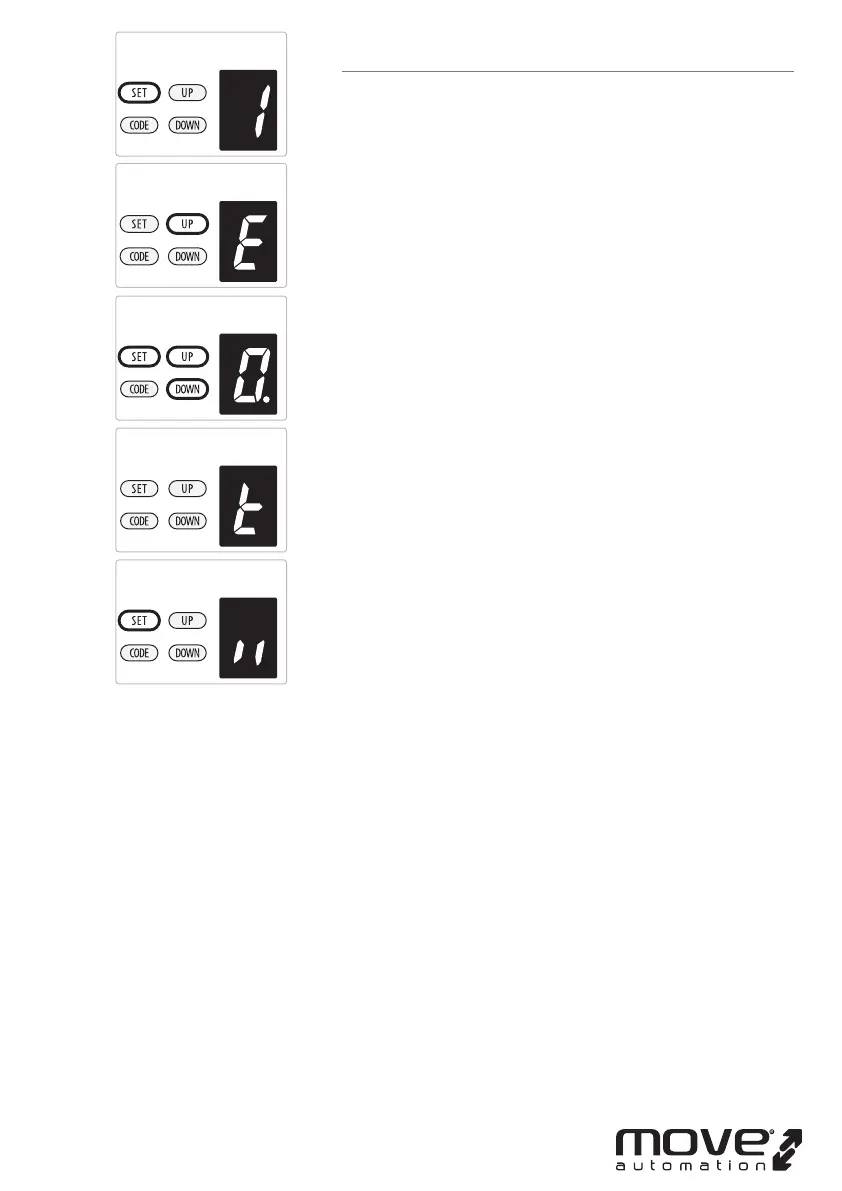
E. MAINTENANCE ALARM - OPERATION CYCLES COUNT
SETTING
a) Press and hold SET Button until “
1” appears on the display,
next press the UP button until “
E” appears on the display to
enter this function setting then release the button.
b) Press the SET button again. The unit is now in the
maintenance alarm adjustment mode. And then you will see
a gure “
0” with ash dot appears on the display.
c) Press UP / DOWN button, you can select the operation cycles
you need the opener to make you notice. You can choose
from “
1-5” set.
Figure “
1” means, after garage door operated to 1000 times,
the L.E.D light will ash 10 times quickly after the door stop
working every time. In order to make you notice that your
garage door need to do maintenance . And at the same time,
you will see a gure “t” appears on the display.
Figure “
2” means the maintenance alarm count cycle is set
on 2000 times.
Figure “
3” means the maintenance alarm count cycle is set
on 3000 times.
Figure “
4” means the maintenance alarm count cycle is set
on 4000 times.
Figure “
5” means the maintenance alarm count cycle is set
on 5000 times.
c) Press SET button to conrm the set and it will be back to
standby status automatically and display “ll”.
NOTE:
1. The operation cycles count is set on “
0” as standard in
factory.
2. “b” appears on display and led light ashes 10 times
quickly means the door lost balance, strong recommend the
maintenance for garage doors.
3. “Check” the status, or “ Re-learn” the travel limit after
maintenance alarm cautions.
-19D-



 To Next Page