EasyManua.ls Logo

mPower Electronics POLI MP400 - Menus and Sub-Menus

mPower Electronics POLI MP400
43 pages
Print Icon
To Next Page IconTo Next Page
To Previous Page IconTo Previous Page
Loading...
POLI User’s Guide
15
You can enter one menu, view or edit the parameters in its submenu by pressing [+/OK]
key.
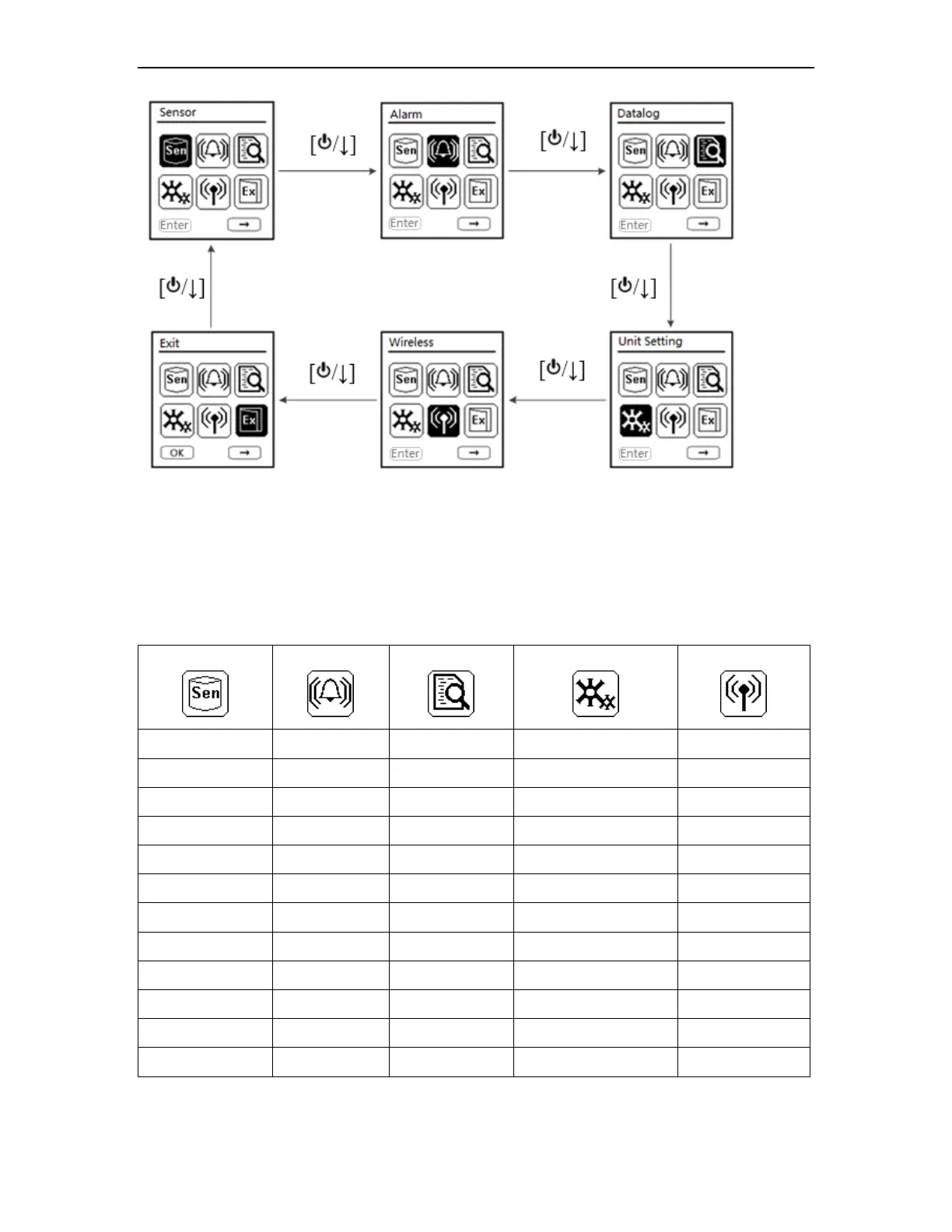
5.2 Menus and Sub-menus
In config mode, menus and submenus are organized as shown here:
Sensor
Alarm
Datalog
Unit Setting
Wireless*
Zero Calib
High Limit
Interval
Heart Beat Light
Wireless On/Off
Span Calib
Low Limit
Clear All
Temperature Unit
Return
Bump Test
STEL Limit
Log Sensor Sel
LCD Contrast
Span Value
TWA Limit
Return
Pump Speed**
Enable/Disable
Alarm Device
Language
Cal Interval
Return
Back Light Mode
Bump Interval
LCD Auto Rotate
Gas Unit
M-Down On/Off
Return
M-Down Timeout
M-Down Thresh
Return
* Wireless version only.
** Pump version only.