11. Introduction to setting parameters
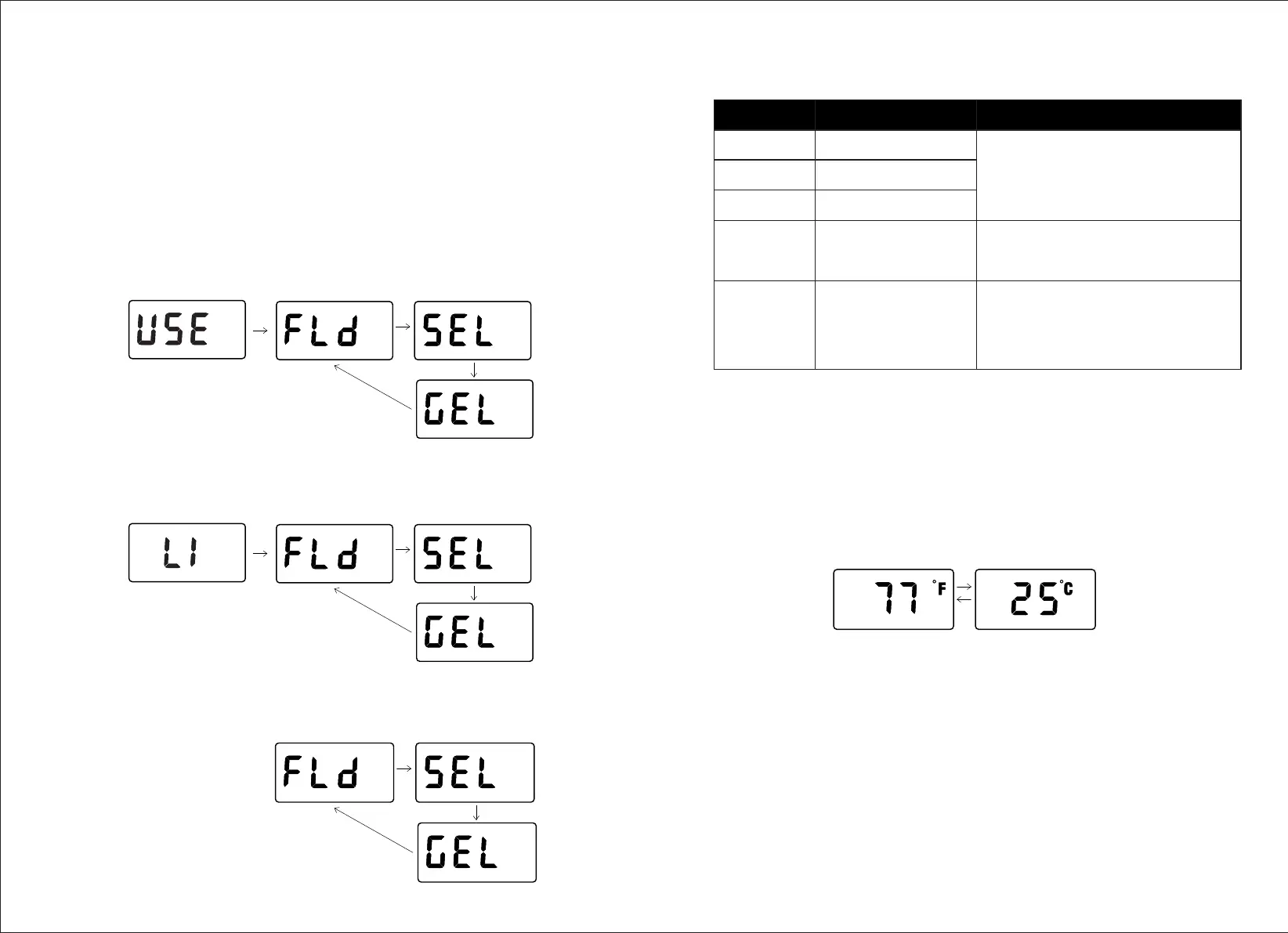
1.Setting Battery Mode
In [Battery Voltage], [Battery SOC], or [Error] page, long press the touch
key to enter the battery type setting.
* Note: If users need to choose USE or LI battery mode, they can only operate through APP.
1.1.Battery Type Setting (USE)
1.2.Battery Type Setting ( LI)
1.3 Other Battery Types Setting:
Battery Type
Description Description
FLD
SEL
GEL
LI
USE
Flooded Lead-acid battery
Sealed Lead-acid
battery - SLD /AGM
Gel Battery
Lithium Battery
Advanced User Mode.
For Professions Only.
Parameters set on default, not adjustable.
Battery system voltage automatically
recognized.
Battery system voltage and parameter
settings are only allowed to set by APP
operation or in the remote display.
Battery system voltage and advanced
parameter settings are only allowed to set
by APP operation.
Part of the parameters could be set in the
remote display.
2.Temperature unit setting:
In the 【Temperature】page, long press the key to enter and set the
temperature unit.
℉ = ℃*1.8 + 32。
09 10


 To Next Page