SMPPT Installation & Operation Manual Version 1.0
18
pressing
+
or
-
,and quit by long pressing
-
. (Photo 5.2-6).A 15s absence of
operation brings you to the main loop interface.
2>
In loop interface, you can adjust parameters by long pressing
+
(>3S )after you
choose corresponding setting item(Photo 5.2-7,value flashes)Then modify value by
short pressing
+
or
-
. By long pressing
+
(>3S) you can save data and quit
parameters settings. A 15s absence of operation brings you to the main loop
interface and the data is invalid.
3>
Other parameter settings refer to the last step.
4>
Setup requirements about Bulk charge voltage, Float charge voltage, LVD, LVR
refer to Photo 5.2.7.
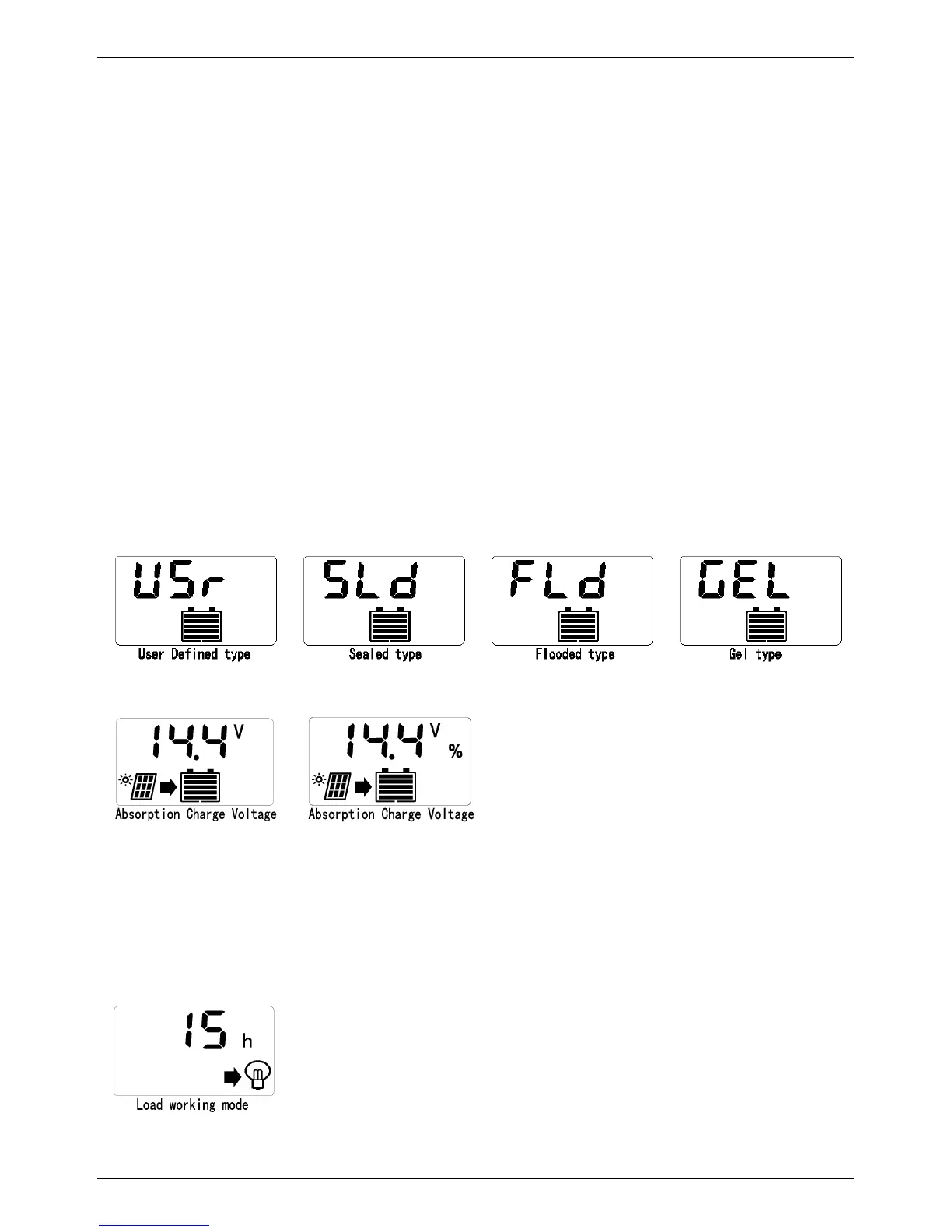
5.2.7 Battery Type
Photo 5.2-8
Photo 5.2-9
1>
Battery type as shown in the photo 5.2-8.
2>
Bulk charge voltage, Float charge voltage, LVD, LVR can be modified only battery
type is User-Defined. % shows it's not been modified.(See photo 5.2-9)
5.2.8 Load Mode
Photo 5.2-10


 To Next Page