5 Operation
Maschinenfabrik Reinhausen 2013 192349487/01 EN TAPGUARD® 260
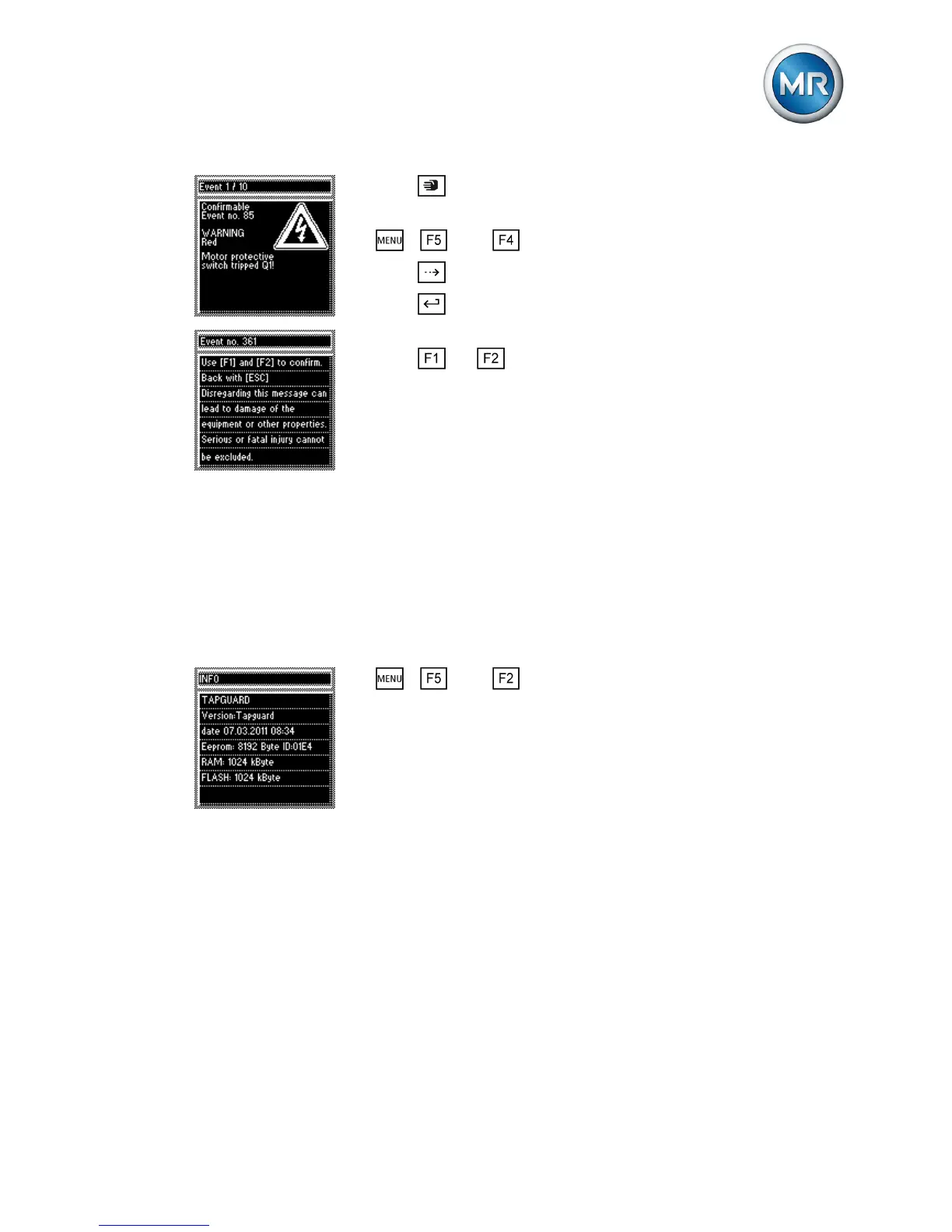
1. Press .
ð The manual mode is active and the associated LED lights up.
2. > Info > Events.
3. Press until the desired event message appears.
4. Press
to acknowledge the event.
ð A warning notice is displayed.
5. Press
and at the same time to acknowledge the event.
ð The event is acknowledged.
Changing event text
The event texts can be adapted to meet customer requirements. To do so,
the TAPCON®-trol visualization software is needed.
The process is described in the operating instructions of the TAPCON®-trol
visualization software that comes with TAPGUARD® 260.
Displaying firmware version and device ID
To display the firmware version and device ID, proceed as follows:
► > Info > Gen. information.
ð The firmware version (date) is shown in the 3rd line.
The device ID is shown in the 4th line (e.g. 01E4)
5.2.3
5.3


 To Next Page