Need help?
Do you have a question about the MRC PRODIGY and is the answer not in the manual?
Input/output voltage, current, address and handheld capability details.
Defines key terms like Command Station, Handheld, Standard Loco, Locomotive Decoder, Run Mode, Program Mode, and Consist Setting Mode.
Provides initial setup instructions and notes for specific system configurations.
Details on selecting run mode, acquiring locos, and basic controls like speed and lights.
Instructions for emergency stop and how the system behaves during an overload condition.
Guidance on creating a program track for efficient decoder programming.
Explains how to assign or change a locomotive's address, including a specific example.
Features to program the voltage for starting and maximum speed of a locomotive.
Settings to simulate realistic train momentum and adjust locomotive direction.
Enables decoder-equipped locos to run on standard analog (DC) layouts.
Guide to programming multiple locos to run together, including adding, deleting, and clearing consists.
Explains the priority system for multiple handhelds controlling locos and system memory capabilities.
Details on managing polarity in reverse loops and information on the Auto Reverse Loop Module.
Information on additional accessories like the PRODIGY DCC Sound Station.
Covers issues like address bank selection, dirty track, decoder memory loss, and power loss.
Steps to take before returning a unit for repair, emphasizing troubleshooting and contacting service.
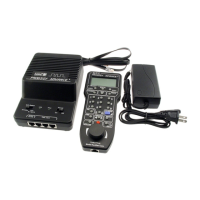
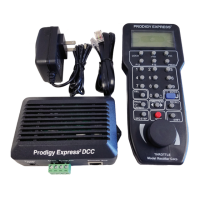
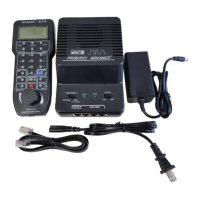
The MRC PRODIGY DCC system is an advanced, user-friendly Digital Command Control (DCC) system designed to enhance the enjoyment of model train layouts. It allows for the control of up to 32 locomotives, enabling multiple users to participate in running trains simultaneously. The system consists of a console (base unit), a handheld controller, and a power supply.
The core function of the PRODIGY DCC system is to send Digital Command Control (DCC) signals to decoders installed in locomotives, controlling their movement and allowing for programming. The console acts as the command station, while the handheld controller is the primary interface for most operations. Up to four handhelds can be plugged into the base unit, with additional handhelds available for purchase.
The system operates in three main modes: Run mode, Program mode, and Consist Setting mode.
Run Mode: This is the primary mode for operating locomotives. In Run mode, users can acquire and control individual locomotives by selecting their address, adjusting speed with the throttle, changing direction, and operating headlights and accessory functions (F1). The system supports controlling both standard locomotives (always assigned address #1) and decoder-equipped locomotives. For emergency stops, a dedicated Stop button halts all operations, indicated by a blinking green LED. Operations can be restored by pressing the Start button. The system also features automatic overload protection, where power to the rails is cut, and both orange and green LEDs blink. Power is restored once the overload is removed.
Program Mode: This mode is used to program a decoder's address and other operational data. To enter Program mode, a handheld must be plugged into jack #1, and the mode switch on the base unit must be set to Program. The Program light will illuminate to indicate active Program mode. A dedicated program track is recommended for programming to avoid affecting other locomotives on the main layout. Programming involves placing the locomotive on the program track, selecting the desired address on the handheld, and pressing the Program Address button. The locomotive will briefly jerk to confirm successful programming.
Key programming features include:
Consist Setting Mode: This mode is used to create, modify, or clear consist groups (multi-lashups) of locomotives. To enter Consist Setting mode, the Consist Setting button is pressed, and the Consist Setting light will glow. In this mode, locomotives can be added to a consist by dialing their address and pressing the Add Loco button. The last added locomotive becomes the lead loco, controlling the speed and direction of the entire consist. Locomotives can be deleted from a consist, or the entire consist can be cleared. Consist settings are temporary and are cleared when the power switch is turned off. The system supports up to four independent consist groups, one per input jack.
The PRODIGY DCC system emphasizes ease of use. Each handheld controller includes simplified "QUICK START" instructions on its reverse side, allowing users to quickly begin operating trains.
Handheld Priority: When multiple handhelds are connected, a priority system is in place. Handheld #1 (plugged into jack #1) has the highest priority, and handheld #4 has the lowest. A higher-priority handheld can take over control of a locomotive acquired by a lower-priority handheld. To avoid confusion, users are advised to unplug their handheld or acquire a non-assigned address once they have finished controlling a locomotive, especially if they are using a lower-priority handheld.
Memory Capabilities: The system retains the last direction and speed of a locomotive even if the controlling handheld is unplugged or acquires a new loco, provided no other handheld acquires that locomotive.
Reverse Loop Operation: The manual provides instructions for setting up a reverse loop using a double-pole double-throw (DPDT) switch to manage track polarity. For automatic operation with decoder-equipped locos, the MRC Auto Reverse Loop Module (AD520) can be used.
The manual includes a troubleshooting section to help users diagnose and resolve common issues.
Troubleshooting Steps:
Service Information: For issues that cannot be resolved through troubleshooting, the manual provides contact information for customer service. Users are advised to read the troubleshooting section first and have specific information (power supply model, shipping address, phone number, and problem description) ready before calling. If a return is necessary, detailed packing instructions are provided to ensure the unit's safe transit.
 General
| Category | Control Unit |
|---|---|
| Manufacturer | MRC |
| Current Rating | 5A |
| Operating Temperature | Information not found |
| Dimensions | Information not found |
| Weight | Information not found |

 To Next Page