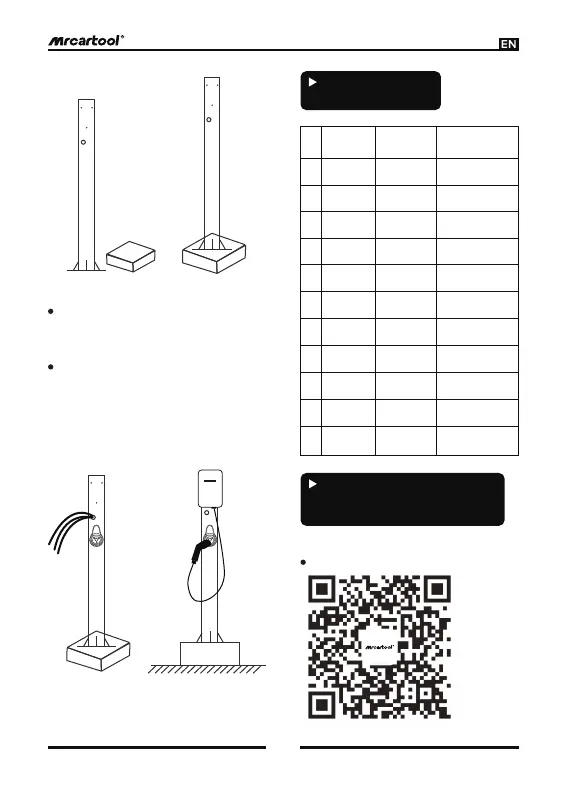
Step 3: Trim the cable, it is most
appropriate for the cable to be 30cm
higher than the column.
Step 4: Pass the cable and other
wires through the waterproof head at
the bottom of the charging pile, fix
the column and the pile with M5*10
hexagon socket screws, and connect
the cable to the terminal.
Step 1 Step 2
Step 3 Step 4
4
Indicator Light
Instruction
Red
Purple
Blue
Red blue
Red green
Blue
Green
Green
Yellow
Red
Purple
No.
1
2
3
4
5
6
Indicator
light color
7
8
9
10
11
Standby
Connect the
charger
Charging
Fully-charged
Press E-stop
CP abnormal
Charging stations
(piles) state
Over-voltage/
under-voltage
Ground wire
not connected
Over-
current
Electric
leakage
Over-
temperature
Always light
Always light
Always light
Always light
Always light
1s blink
once
Indicator
light dynamic
1s blink
once
1s blink
once
1s blink
once
Alternate
flashing 1s
Alternate
flashing 1s
1. App download and installation
Scan the QR code to install the app.
Instructions For
Connecting The Mobile
Phone To The Device


 To Next Page