Page 19 mrcool.com
Unit Installation
Electrical Connection
Connecting the Power Cord & Thermostat Wire
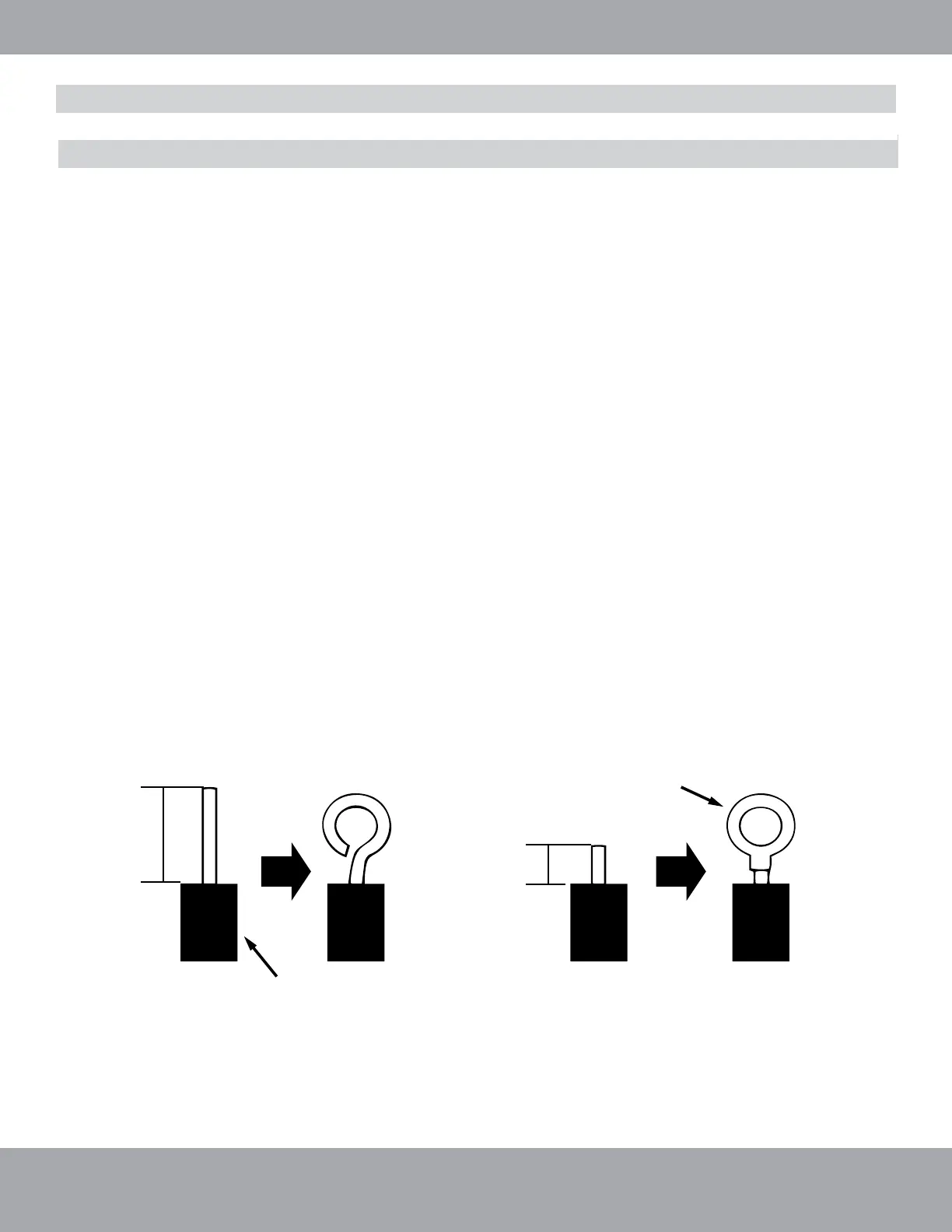
For solid wires (Refer to Fig. 2.10 A):
1. Use wire cutters to cut off the wire end and then peel away about 25mm of the insulation layer.
2. Use a screwdriver to unscrew the terminal screw on the terminal board.
3. Use nippers to bend the solid wire into a ring that fits the terminal screw.
4. Form a proper ring and attach to the terminal board. Use a screwdriver to tighten the terminal screw.
For braided wires (Refer to Fig. 2.10 B & Fig. 2.10):
1. Use wire cutters to cut off the wire end and then peel away about 10mm of the insulation layer.
2. Use a screwdriver to unscrew the terminal screw on the terminal board.
3. Use a round terminal fastener or clamp to secure the round terminal firmly on the peeled wire end.
4. Locate the round terminal conduit. Use a screwdriver to replace it and tighten the terminal screw (as
shown in Fig. 2.10).
A. Solid Wire
Jacket / Insulation
1” (25mm)
B. Braided Wire
Solderless
Terminal
3/8” (10mm)
Fig. 2.10





 To Next Page