- 2 -
For Win98, please make sure the data transfer is completed before unplugging the MP3 player.
Charge the Battery
The device has a built-in lithium-icon rechargeable battery. It is charged via USB connection. You
are required to charge it when you use it for the first time. It takes about 3 hours to fully charge the
battery. Connect the larger end of the USB cable to the USB interface of PC, and connect the other
smaller end of the USB cable to the USB interface of this player. The device is connected to PC and
being charged.
NOTICE: For maximum performance, lithium-ion batteries need to be used often. If you don’t use the device
often, be sure to recharge the battery at least once per month.
Use a Memory Card
The device has a memory card slot for reading data from a micro-SD card.
(1) Insert a Micro-SD card to the card slot on the unit body.
(2) Press and hold the MENU button to display the main menu.
(3) Select “Explorer” and press the MENU button to enter the folder browser mode.
(4) In the folder browser mode, you see two folders named “Internal memory” and “Memory Card”.
To play the audio or video files stored on the MicroSD card, access the “Memory Card” folder.
Keys Description
Power On/Off
To turn on the device, slide the Power Switch to “ON” to turn on the power, and then press and
hold the PLAY/PAUSE button until you see prompt on the display.
To power off the device, press and hold the PLAY/PAUSE button until you see prompt on the
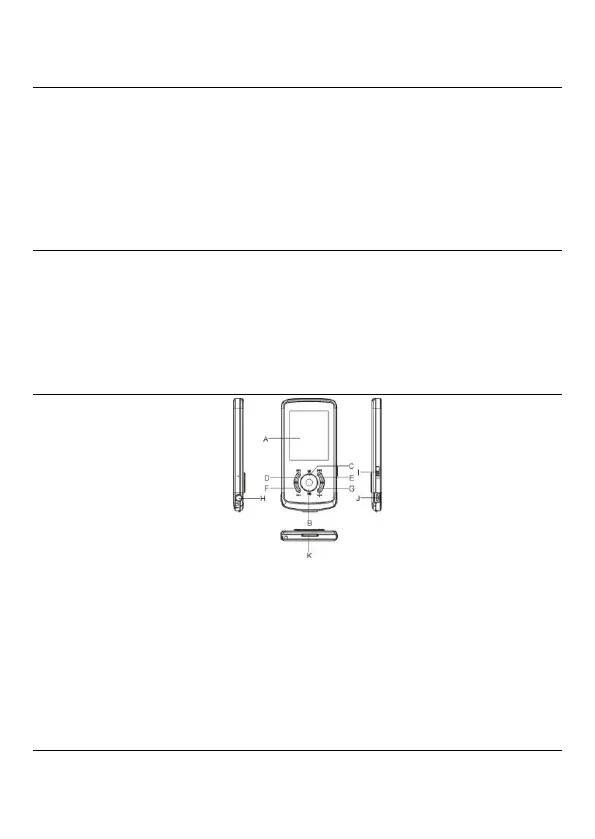
A. LCD Display
B. Play/Pause: Turn on or turn off the
device. Also play or pause audios.
C. MENU: Hold for a while to enter the
main menu. Briefly press to confirm
selection confirm or enter the folder
navigation mode.
D. Previous: Play the previous track. Also
move up.
E. Next: Play the next track. Also move
down.
F. VOL+: Turn up the volume.
G. VOL-: Turn down the volume.
H. Earphone Jack
I. Power Switch: Turn on or turn off the
power.
J. USB Port: Connect to a computer.
K. Memory Card Slot: For inserting a Micro
SD-card.


 To Next Page