EVOLUTION 6000 Thermal Imaging Camera
30
Use
MSA
US
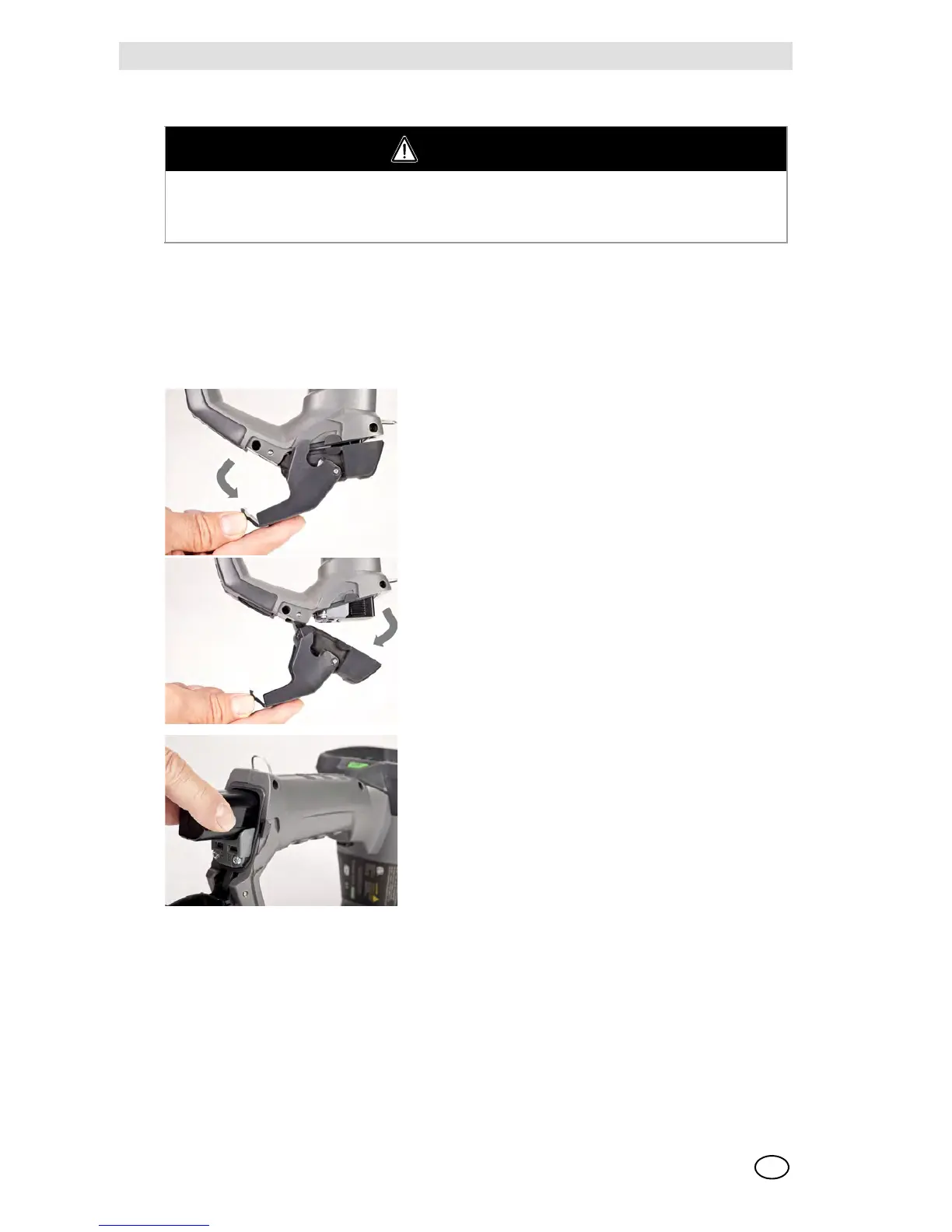
3.10 Battery Installation
The EVOLUTION 6000 series cameras run on a single lithium Ion battery pack.
Replacement batteries must have the same power and layout as those delivered by MSA with the
camera. Unsuitable batteries can lead to a system failure.
NOTE: To remove battery, reverse the above Battery Installation procedure.
WARNING
Risk of injury!
Never replace the batteries in a hazardous location or an explosive atmosphere. There is a risk
of explosion since the batteries can spark when being changed!
(1) Place the camera on a clean, non-abrasive surface.
(2) Open the battery compartment by pulling down on
the battery latch and swinging the battery compart-
ment door forward.
(3) Place the battery inside the battery compartment
with the battery logo and arrow pointing toward the
top of the camera. The battery compartment is de-
signed to prevent incorrect battery insertion.
(4) Gently push the battery into place.
(5) Close and latch the battery compartment.



 To Next Page