52
3103-1001 Rev. 0
the user should press it after all desired changes have been made. This restarts the sequencer with the
new point order selections implemented.
"System Menu" - An HMI navigation button which switches the screen back to the System Setup
Menu.
The Point Order screen on MultiGard 5000 24, 32, Dual 8 and Dual 16 Systems are identical. The
only exception is the entries that are considered to be valid are limited by the size of the system. For
example, “32” would not be a valid entry on an 8, 16 or 24 point system.
Dual MultiGard 5000 Systems_________________________________________________________
The previous paragraph applies to the dual MultiGard 5000 Systems. There are two Point Order
screens; System A and System B. Note that each system in the dual MultiGard 5000 systems can
have 32 steps.__ ____________________________________
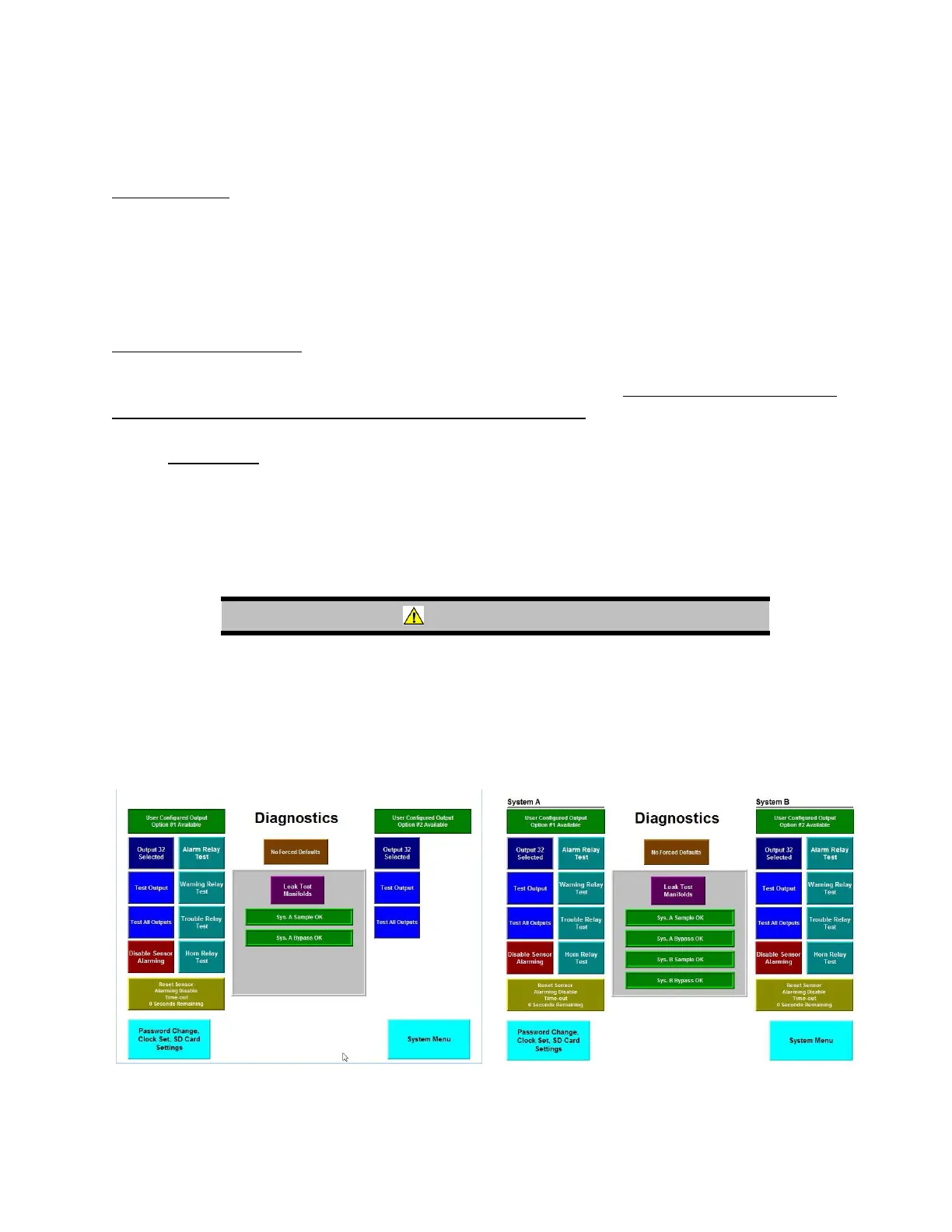
4.2.9 Diagnostics
The Diagnostic screen provides a variety of test features for use by the operator. Most significant are
the common alarming relay tests, the UCO tests, and the simultaneous leak test of both sample and
bypass manifolds.
WARNING
Test buttons described in this section activate the output circuits
wired to the MultiGard 5000 System. Be sure the consequences
associated with randomly activating the outputs are properly
considered before any action is taken; otherwise a hazardous
condition may result.
Figure 34: System Diagnostics Figure 35: System Diagnostics (Dual)



 To Next Page