84
3103-1001 Rev. 0
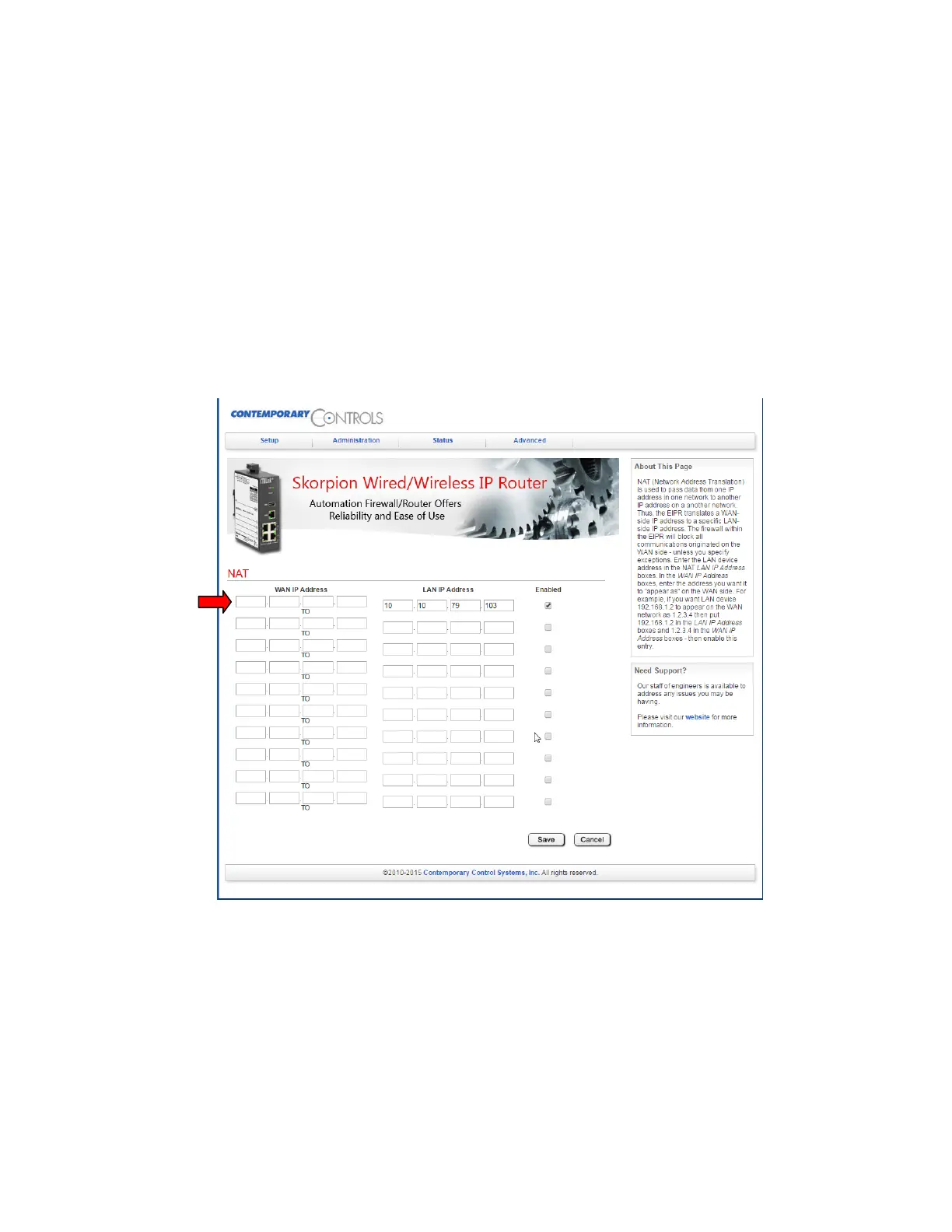
To set the IP address of the Modbus/BACNet gateway as it will appear on the user’s network you
must enter the NAT settings of the router. From the main screen, hover over “Advanced” in the title
menu and click on “NAT”. The screen will appear as in Figure 43 except “10.10.79.103” will not
appear in the “LAN IP Address” column on the right and the “Enabled” checkbox will not be
checked. The user will to enter the LAN side IP address of “10.10.79.103” and check the “Enabled”
box. The user will then need to define the WAN side IP address where they would like the BACNet
IP or Modbus TCP data to be accessed once connected to their network. This address entry is
marked with a red arrow in Figure 56. Click “Save” when complete and the router will reboot after
30 seconds. Follow instructions from section 11.2 above to regain access to the router main
configuration screen once the reboot has completed.
Figure 56: NAT Screen



 To Next Page