Alarm Statuses
Alarm LEDs Acoustic
1st threshold Gauge green lighted and blinking 1 Beep
2nd threshold Gauge yellow lighted and blinking 2 Beep
≤ 60 bar
Gauge red & buddy lights lighted
and blinking
2 Beep
Battery warning Bottom red None
Manual alarm
Gauge red & buddy lights lighted
and blinking
Distinct pattern
Motion pre-alarm
Gauge red & buddy lights lighted
and blinking
Increasingly louder consecutive
variable tones
Motion alarm
Gauge red & buddy lights lighted
and blinking
Distinct pattern
The user can acknowledge an alarm after it is triggered.
Alarm Acknowledge
1st threshold Not necessary, since short acoustic signal.
2nd threshold Not necessary, since short acoustic signal.
≤ 60 bar
Confirmation only possible below 15bar pressure: Push the alarm
button twice.
Pneumatic whistle cannot be confirmed.
Alarm will continuously appear.
Battery warning
Exchange batteries – outside of hazardous area only
Replacing the battery after the operation.
Manual alarm Push the alarm button twice.
Motion pre-alarm Movement of SingleLine SCOUT
Motion alarm Push the alarm button twice.
Cylinder Pressure Display
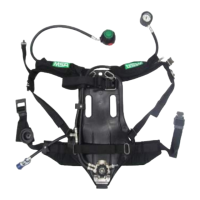
The cylinder pressure is displayed via the integrated analogue gauge and additionally detected from an
internal pressure sensor. Current pressure can be read from the gauge using the imprinted scale.
The up-to-date filling level of the compressed air cylinders is displayed in 3 stages, in accordance with the
following coding, using 3LEDs on each side of the gauge when the device is lifted from the user’s chest.
Following thresholds represent the standard setting and can be changed using MSA A2 Software in
combination with 10181672 as PC interface.
See MSA A2 Software for more details.
11
GB
4 Use



 To Next Page