2-12
Hardware Setup
▍
MS-7576
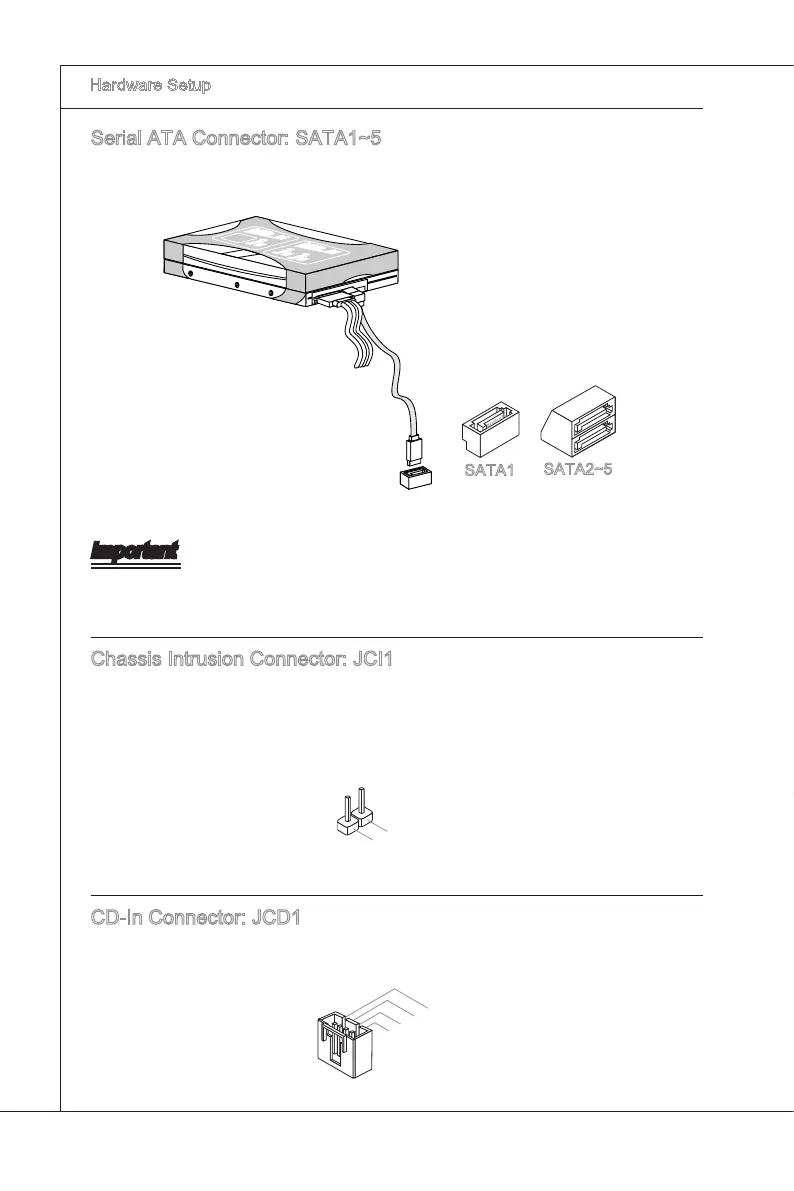
Seral ATA Connector: SATA1~5
Ths connector s a hgh-speed Seral ATA nterface port. Each connector can connect
to one Seral ATA devce.
F
l
o
p
p
y
D
M
S
I
F
l
o
p
p
y
D
M
S
I
K
d
k
l
k
d
k
f
k
k
k
f
d
k
k
l
d
d
f
k
k
k
s
d
d
f
d
d
f
a
s
d
k
a
d
f
-
d
d
f
d
d
a
d
d
f
d
f
d
d
d
d
d
f
a
d
f
a
d
k
j
a
s
j
d
k
d
f
d
f
a
s
d
d
d
f
f
a
s
d
f
d
d
d
d
d
d
d
f
d
a
s
f
d
a
s
a
s
d
f
a
s
d
a
s
d
a
s
d
d
d
d
d
d
d
f
a
s
a
s
d
f
s
d
f
f
s
d
f
a
d
f
f
f
a
s
d
f
f
f
d
f
F
l
o
p
p
y
D
M
S
I
K
d
k
l
k
d
k
f
k
k
k
f
d
k
k
l
d
d
f
k
k
k
s
d
d
f
d
d
f
a
s
d
k
a
d
f
-
d
d
f
d
d
a
d
d
f
d
f
d
d
d
d
d
f
a
d
f
a
d
k
j
a
s
j
d
k
d
f
d
f
a
s
d
d
d
f
f
a
s
d
f
d
d
d
d
d
d
d
f
d
a
s
f
d
a
s
a
s
d
f
a
s
d
a
s
d
a
s
d
d
d
d
d
d
d
f
a
s
a
s
d
f
s
d
f
f
s
d
f
a
d
f
f
f
a
s
d
f
f
f
d
f
SATA2~5
SATA1
Important
Please do not fold the Seral ATA cable nto 90-degree angle. Otherwse, data loss may
occur durng transmsson.
Chasss Intruson Connector: JCI1
Ths connector connects to the chasss ntruson swtch cable. If the chasss s opened,
the chasss ntruson mechansm wll be actvated. The system wll record ths status
and show a warnng message on the screen. To clear the warnng, you must enter the
BIOS utlty and clear the record.
CD-In Connector: JCD1
Ths connector s provded for external audo nput.


 To Next Page