3-10
BIOS Setup
▍
MS-7576
MPS Table Verson
Ths eld allows you to select whch MPS (Mult-Processor Speccaton) verson to be
used for the operatng system. You need to select the MPS verson supported by your
operatng system. To nd out whch verson to use, consult the vendor of your operatng
system.
Prmary Graphc’s Adapter
Ths settng speces whch graphc card s your prmary graphcs adapter.
PCI Latency Tmer
Ths tem controls how long each PCI devce can hold the bus before another takes
over. When set to hgher values, every PCI devce can conduct transactons for a longer
tme and thus mprove the eectve PCI bandwdth. For better PCI performance, you
should set the tem to hgher values.
CPU Feature
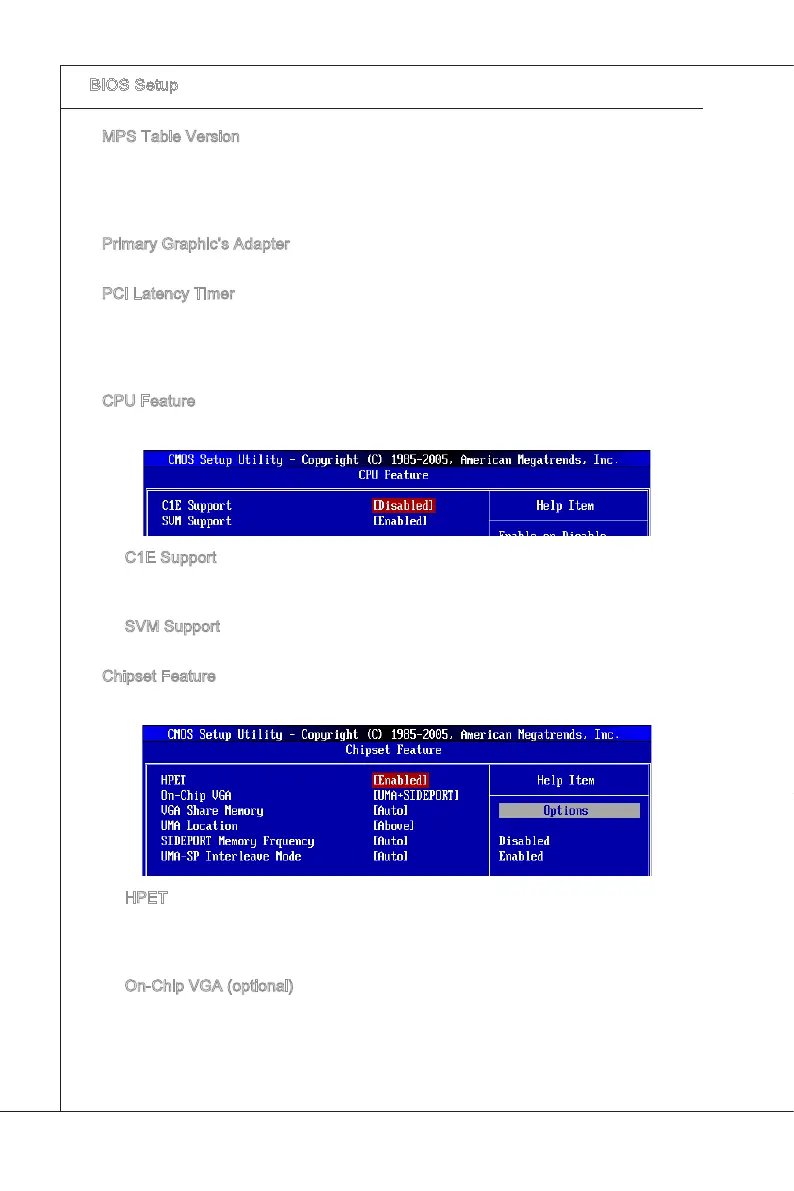
Press <Enter> to enter the sub-menu and the followng screen appears:
C1E Support
To enable ths tem to red the CPU power consumpton whle dle. Not all porcessors
support Enhanced Halt tate (C1E).
SVM Support
Ths tem s used to enable/ dsable SVM.
Chpset Feature
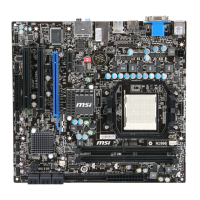
Press <Enter> to enter the sub-menu and the followng screen appears:
HPET
The HPET (Hgh Precson Event Tmers) s a component that s part of the chpset.
You can to enable t, and wll provde you wth the means to get to t va the varous
ACPI methods.
On-Chp VGA (optonal)
Ths tem speces whether to allocate the memory for onboard VGA from the
system memory or sdeport memory. Settng to [UMA], allocates the system share
memory for onboard VGA. Settng to [SIDEPORT], allocates the sdeport memory
for onboard VGA. Settng to [UMA+SIDEPORT], allocates both system memory and
sdeport memory for onbaord VGA.
▶
▶
▶
▶
▶
▶
▶
▶
▶


 To Next Page