3-11
BIOS Setup
▍
MS-7576
VGA Share Memory
Ths settng controls the exact memory sze shared to the VGA card.
UMA Locaton
Ths functon s used to select the locaton of UMA to avod overlapng wth the other
data blocks n system memory.
SIDEPORT Memory Frequency (optonal)
Ths tem allows you to set the SIDEPORT memory frequency (n MHz).
UMA-SP Interleave Mode (optonal)
Ths tem allows you to adjust the rato of UMA to SIDEPORT memory.
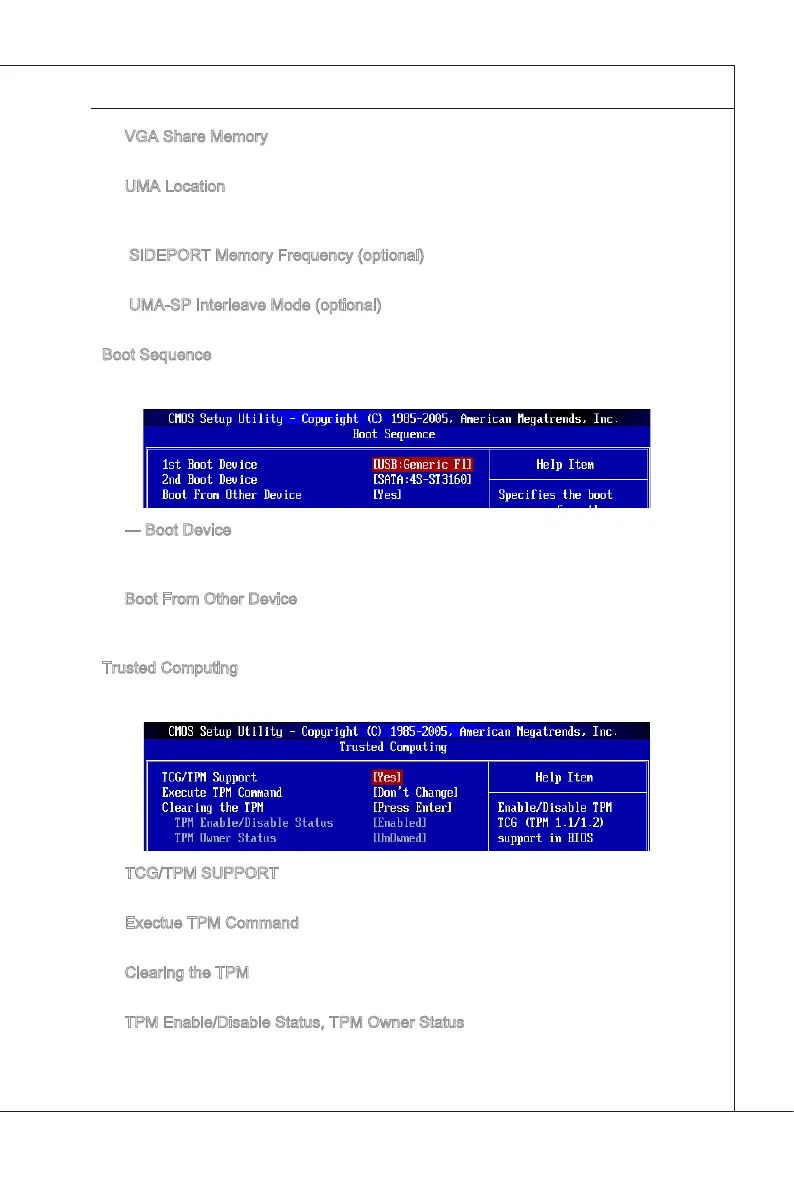
Boot Sequence
Press <Enter> to enter the sub-menu and the followng screen appears:
--- Boot Devce
These tems allow you to arrange the order that the BIOS uses to look for a boot
devce from whch to load the operatng system durng the boot process.
Boot From Other Devce
Settng the opton to [Yes] allows the system to try to boot from other devce, f the
system fals to boot from above devces.
Trusted Computng
Press <Enter> to enter the sub-menu and the followng screen appears:
TCG/TPM SUPPORT
Settng the opton to [Yes] enables TPM (Trusted Platform Module) to the system.
Exectue TPM Command
Ths tem allows you to enable/ dsable the Execute TPM Command feature.
Clearng the TPM
Press Enter to clear the TPM status.
TPM Enable/Dsable Status, TPM Owner Status
These two tems show the TPM status.
▶
▶
▶
▶
▶
▶
▶
▶
▶
▶
▶
▶


 To Next Page