38
CPU & Cooler
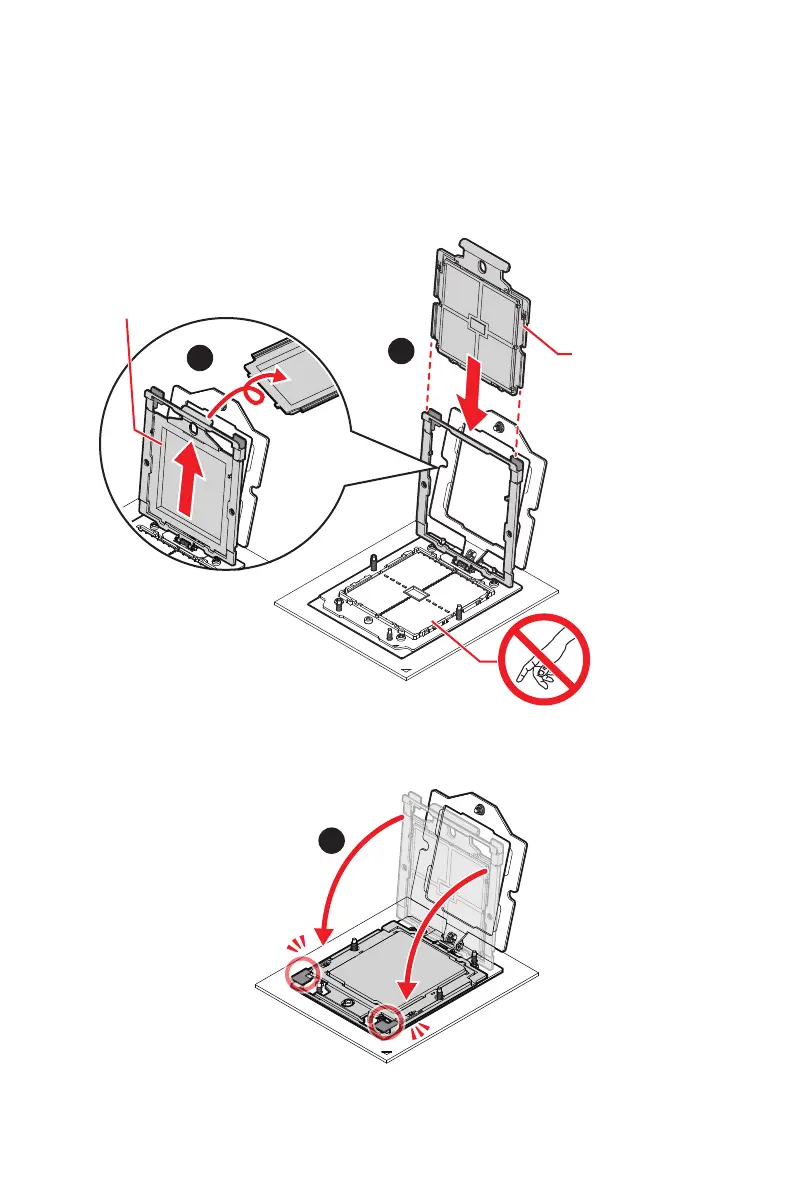
4. Pull the external cap upward through the rail guides on the rail frame to remove it.
5. Grip the handle of the carrier frame and slide it downward with the flanges and the
rail guides aligned.
∙
CPUs are shipped from the factory with pre-assembled carrier frames.
∙
Make sure the flanges of the carrier frame are firmly loaded on the rails before
closing the rail frame.
External cap
Carrier frame
Do not touch the
socket content!
6. Grip the lift tabs at the front edge of the rail frame with the carrier frame loaded,
then gently lower it to engage the carrier’s latching mechanism to the socket
housing.


 To Next Page
 Loading...