39
CPU & Cooler
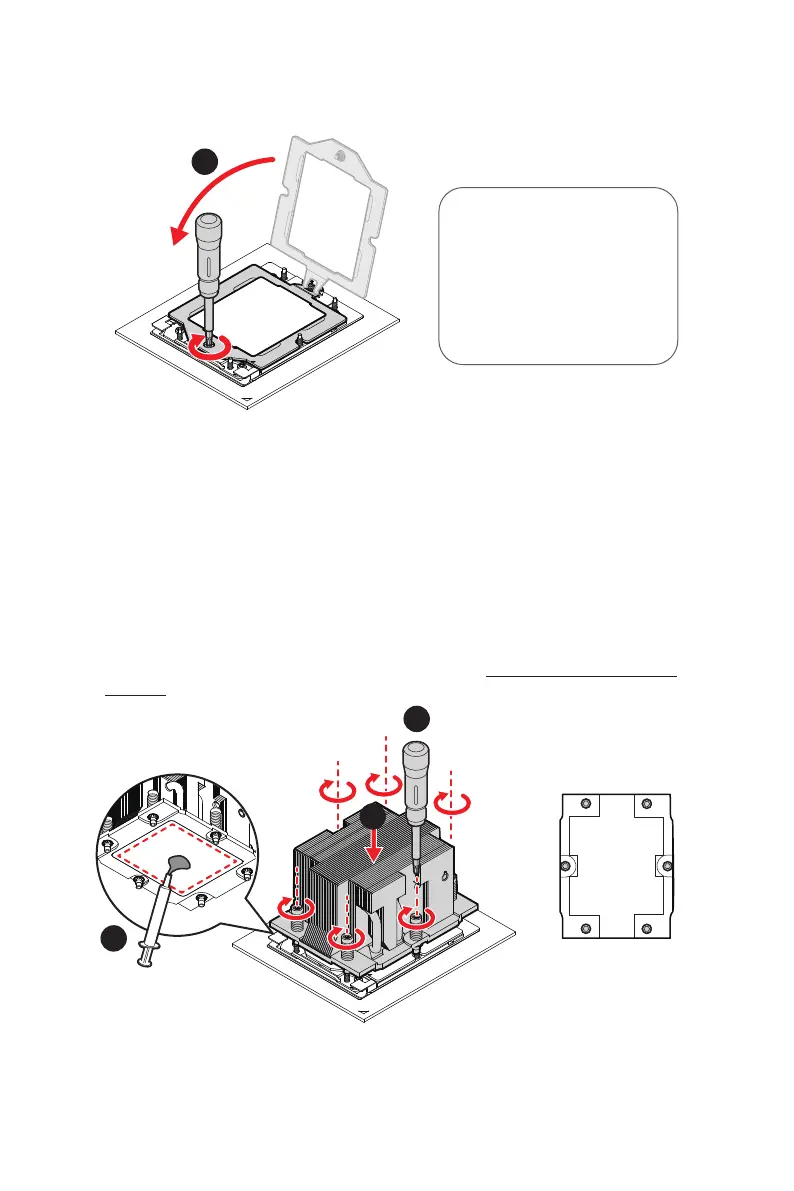
7. Push the retention frame downward and use a torque screwdriver to tighten the
screw in the middle.
Torque Screwdriver Settings
Screw Head: Torx T20
Torque: 12.5-15 kgf·cm*
*12.5-15 kgf·cm
= 122.6~147 N·m
= 10.9~13 lbf·in
8. For peak thermal performance, apply proper amount of thermal paste to the
bottom center of the heatsink. (Skip this step if there is pre-applied thermal paste.)
9. Lower the heatsink until it rests firmly in place after aligning the six screw holes
on its bottom with the motherboard’s studs.
10. Tighten all screws in diagonal sequence with a torque screwdriver.
∙
To avoid damaging the fins of the heatsink, always grip the heatsink along the axis
of the fins. Holding a heatsink along the side might damage its fins or solder.
∙
To avoid distributing uneven pressure on the CPU, it is recommended to secure
the heatsink in two steps: first, loosely attach the screws at six points and then
gradually tighten them.
∙
For water cooling module installation, please refer to “ Installing Liquid Cooling
Module”.
#1
#2
#3#5
#4
#6


 To Next Page
 Loading...