BIOS Setup
3-17
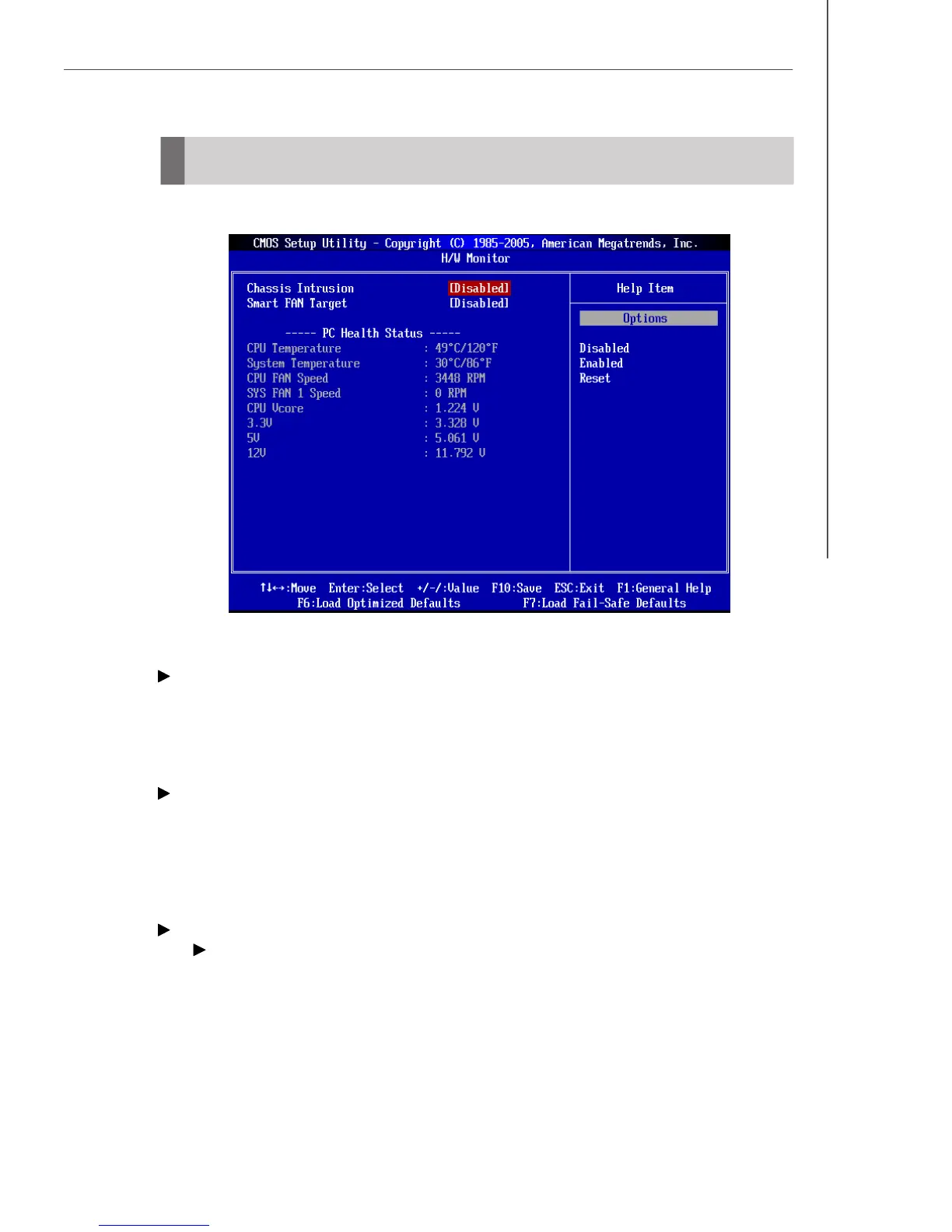
Chassis Intrusion
The field enables or disables the feature of recording the chassis intrusion status
and issuing a warning message if the chassis is once opened. To clear the warning
message, set the field to [Reset]. The setting of the field will automatically return to
[Enabled] later.
Smart FAN Target
The mainboard provides the Smart Fan function which can control the CPU fan speed
automatically depending on the current temperature to keep it within a specific range.
You can select a fan target value here. If the current CPU fan temperature reaches to
the target value, the smart fan function will be activated. It provides several sections
to speed up for cooling down automatically.
PC Health Status
CPU/System Temperature, CPU FAN/SYS FAN1 Speed, CPU Vcore,
3.3V, 5V, 12V
These items display the current status of all of the monitored hardware devices/
components such as CPU voltage, temperatures and all fans’ speeds.
H/W Monitor




 To Next Page