MS-7501 Mainboard
3-20
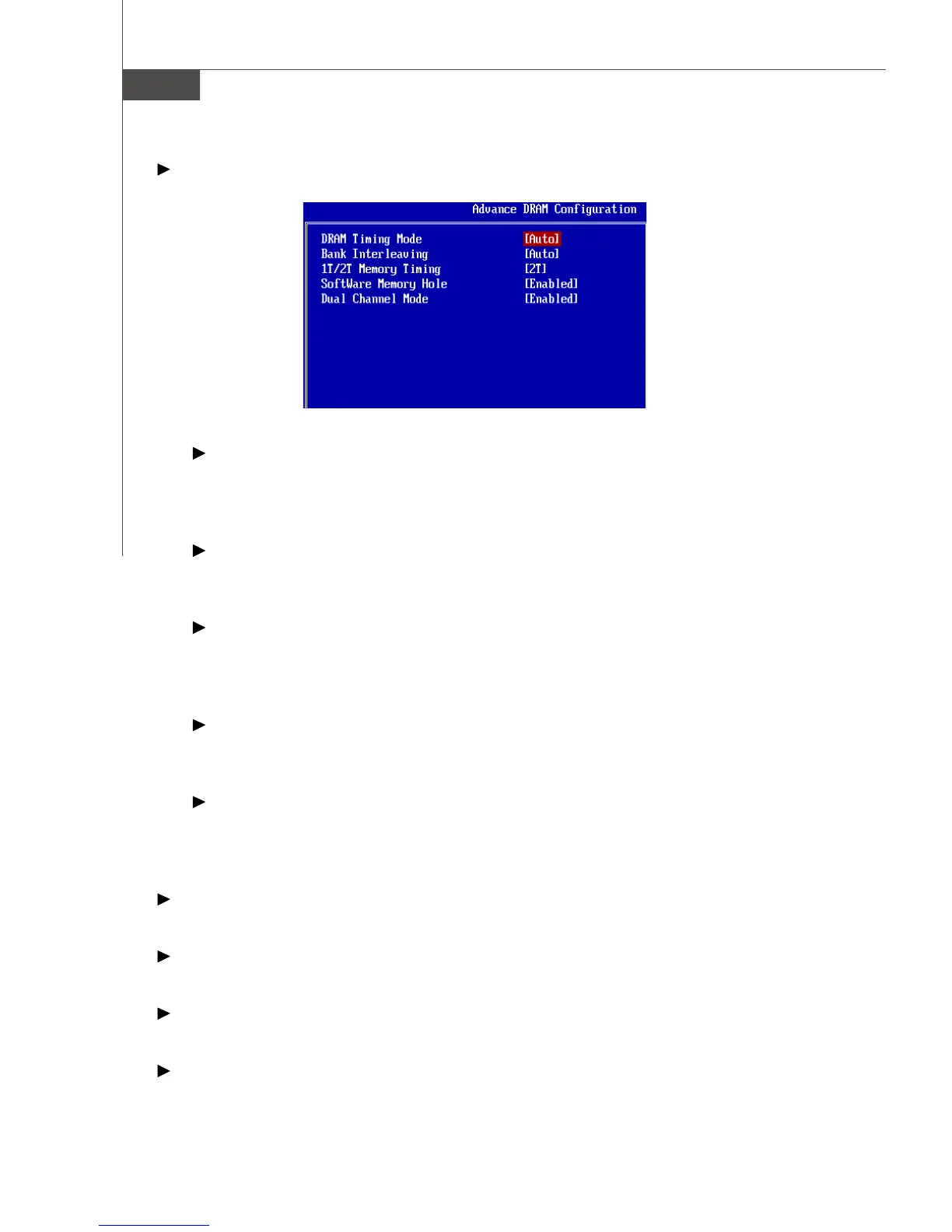
Advance DRAM Configuration
DRAM Timing Mode
Setting to [Auto] enables DRAM CAS# Latency automatically to be determined by
BIOS based on the configurations on the SPD (Serial Presence Detect) EEPROM
on the DRAM module.
Bank Interleaving
This field selects 2-bank or 4-bank interleave for the installed SDRAM. Disable
the function if 16MB SDRAM is installed.
1T/2T Memory Timing
This field controls the SDRAM command rate. Selecting [1T] makes SDRAM
signal controller to run at 1T (T=clock cycles) rate. Selecting [2T] makes SDRAM
signal controller run at 2T rate.
Software Memory Hole
This field enables software to remap the physical memory to the address higher
than 00E0. (This item only works in 64-bit OS.)
Dual Channel Mode
In Dual-Channel mode, the memory modules can transmit and receive data with
two data bus lines simultaneously. Enabling Dual-Channel mode can enhance
the system performance.
FSB/Memory Ratio
This item will allow you to adjust the FSB/Ratio of the memory.
Adjusted DRAM Frequency (MHz)
It shows the adjusted DDR memory frequency. Read only.
HT Link Speed
This item allows you to set the Hyper Transport link speed.
Adjust PCI-E Frequency (MHz)
This item allows you to set the PCI Express frequency (in MHz).




 To Next Page