En-11
Englsh
back panel
Mouse/Keyboard
Optcal
S/PDIF-out
DVI-D Port
VGA Port
(optonal)
1394 Port
USB Port
USB Port
LAN
Lne-In
Lne-Out
Mc
RS-Out
CS-Out
SS-Out
USB Port
E-SATA Port
USB Port
HDMI Port
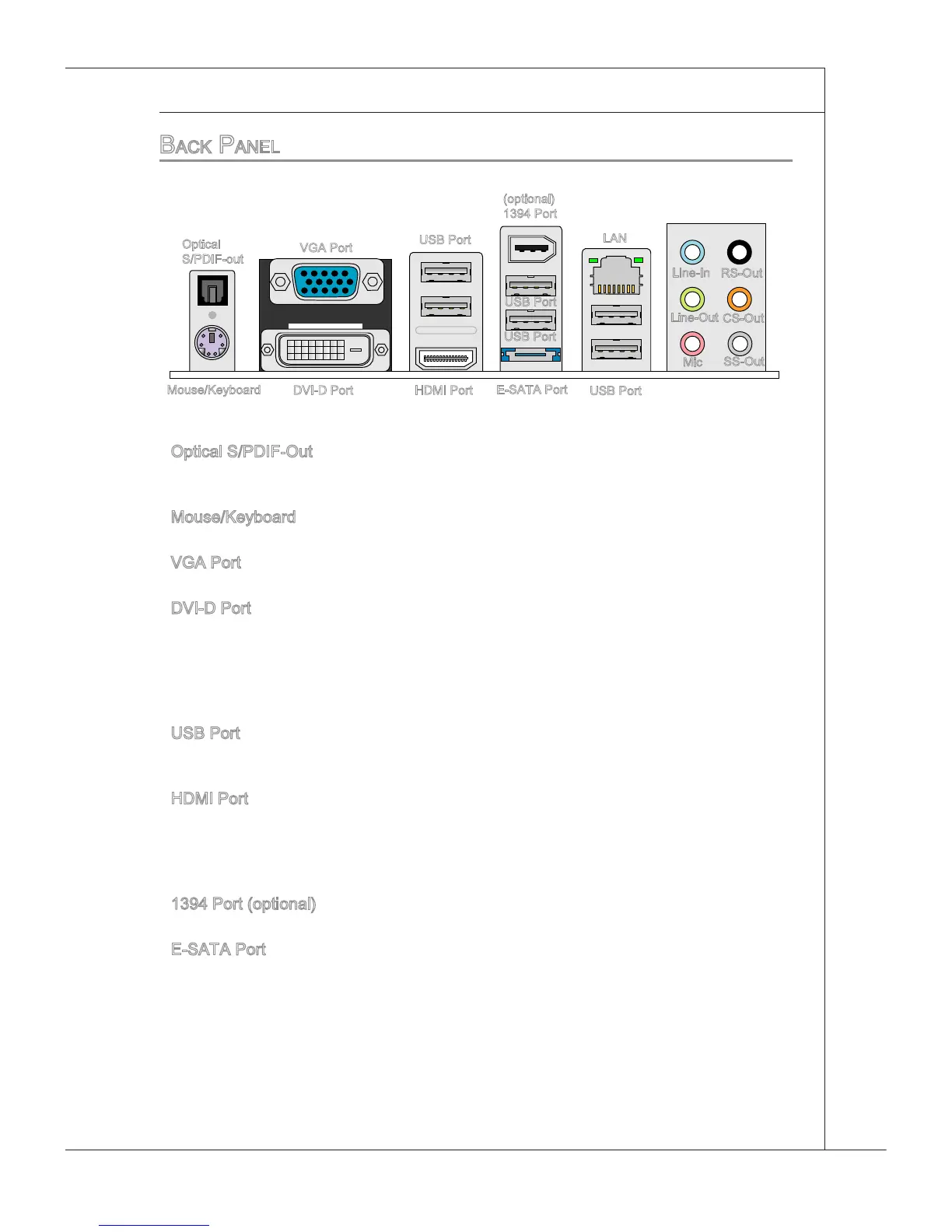
Optcal S/PDIF-Out
Ths SPDIF (Sony & Phlps Dgtal Interconnect Format) connector s provded for dgtal
audo transmsson to external speakers through an optcal ber cable.
Mouse/Keyboard
The standard PS/2
®
mouse/keyboard DIN connector s for a PS/2
®
mouse/keyboard.
VGA Port
The DB15-pn female connector s provded for montor.
DVI-D Port
The DVI-D (Dgtal Vsual Interface-Dgtal) connector allows you to connect a LCD
montor. It provdes a hgh-speed dgtal nterconnecton between the computer and
ts dsplay devce. To connect an LCD montor, smply plug your montor cable nto the
DVI-D connector, and make sure that the other end of the cable s properly connected
to your montor (refer to your montor manual for more nformaton.)
USB Port
The USB (Unversal Seral Bus) port s for attachng USB devces such as keyboard,
mouse, or other USB-compatble devces.
HDMI Port
The Hgh-Denton Multmeda Interface (HDMI) s an all-dgtal audo/vdeo nterface
capable of transmttng uncompressed streams. HDMI supports all TV format, nclud
-
ng standard, enhanced, or hgh-denton vdeo, plus mult-channel dgtal audo on a
sngle cable.
1394 Port (optonal)
The IEEE1394 port on the back panel provdes connecton to IEEE1394 devces.
E-SATA Port
The E-SATA (External-SATA) port s for attachng the E-SATA hard drve.
▶
▶
▶
▶
▶
▶
▶
▶



 To Next Page