2-7
Hardware Setup MS-S0891
U-DIMM Module Support
DIMM &
Data Width
2 DPC
(DIMM per Channel)
1.35V 1.5V
SRx8 ECC 1066, 1333, 1600 1066, 1333, 1600
DRx8 ECC 1066, 1333, 1600 1066, 1333, 1600
Installing Memory Modules
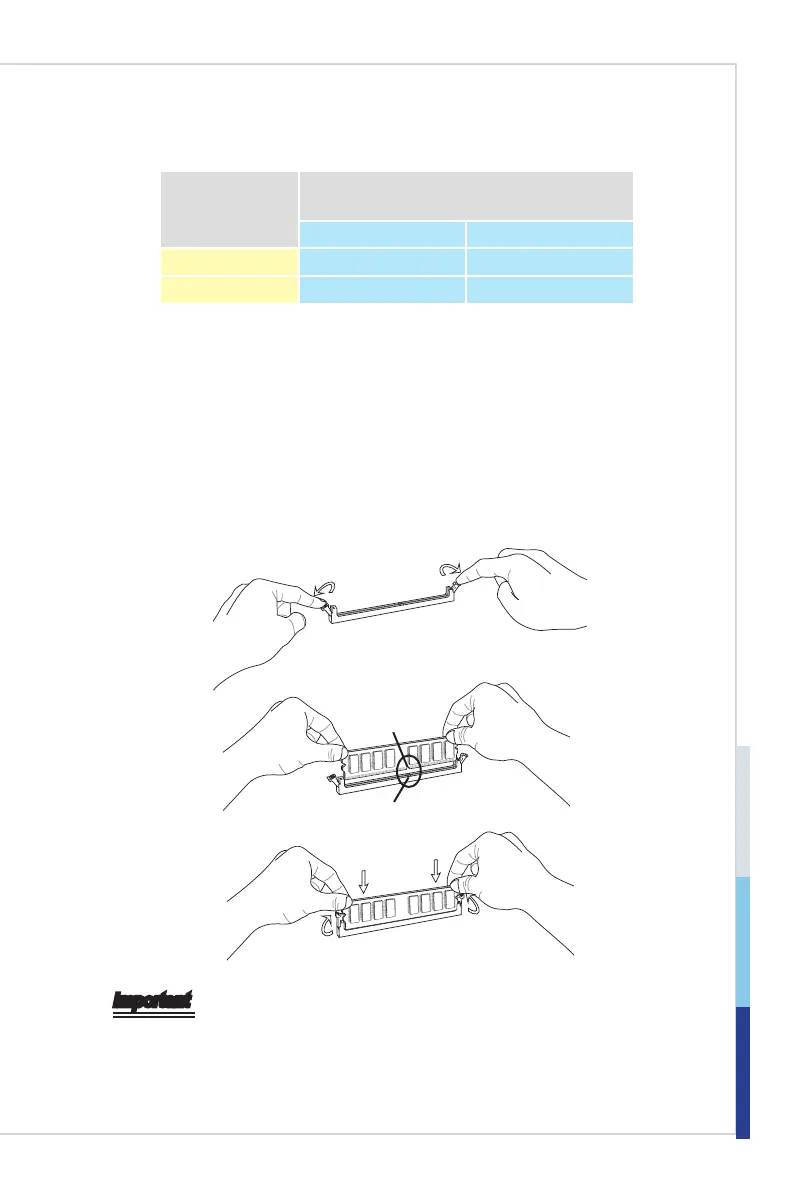
The memory module has only one notch on the center and will only t in the
right orientation.
Insert the memory module vertically into the DIMM slot. Then push it in until
the golden nger on the memory module is deeply inserted in the DIMM slot.
The plastic clip at each side of the DIMM slot will automatically close when
the memory module is properly seated.
Manually check if the memory module has been locked in place by the DIMM
slot clips at the sides.
Notch
Volt
Important
You can barely see the golden nger if the memory module is properly inserted
in the DIMM slot.
1.
2.
3.


 To Next Page