EasyManua.ls Logo

MSI MS-S1311 - Power Supply; Power Connectors

MSI MS-S1311
68 pages
Print Icon
To Next Page IconTo Next Page
To Previous Page IconTo Previous Page
Loading...
2-12
Hardware Setup MS-S1311
Power Supply
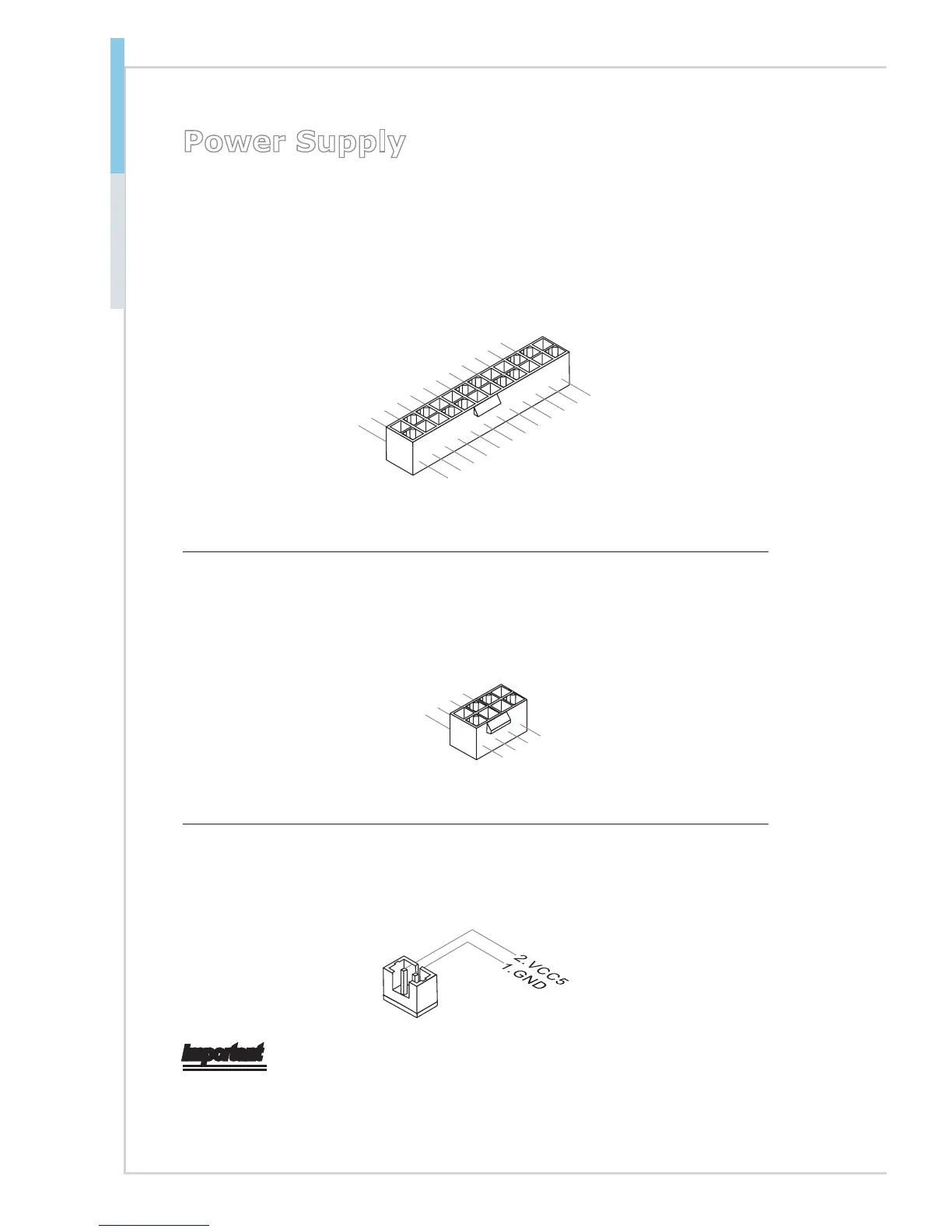
System Power Connector: JPWR3
This connector allows you to connect a power supply. To connect to the power
supply, make sure the plug of the power supply is inserted in the proper orienta-
tion and the pins are aligned. Then push down the power supply rmly into the
connector.
13.+3.3
V
1.+3.3
V
14.-12V
2.+3.3V
15.Ground
3.Ground
16.PS-ON#
4.+5V
17.Ground
5.Ground
18.Ground
6.+5V
19.Ground
7.Ground
22.+5V
10.+12V
20.-5V
8.PWR OK
23.+5V
11.+12V
21.+5V
9.5VSB
24.Ground
1
2.+3.3V
CPU Power Connector: JPWR1
This connector provides 12V power output to the onboard CPU.
7.+12V
3.
Ground
5.+12V
1.
Ground
8.+12V
4
.Ground
6.+12V
2.Ground
SATA DOM Power Connector: JSDOMPWR1
This connector provides power to the SATA DOM devices.
Important
Make sure that all power connectors are connected to the power supply to ensure
stable operation of the motherboard.

Table of Contents