System Operations (Windows 7)
3-18
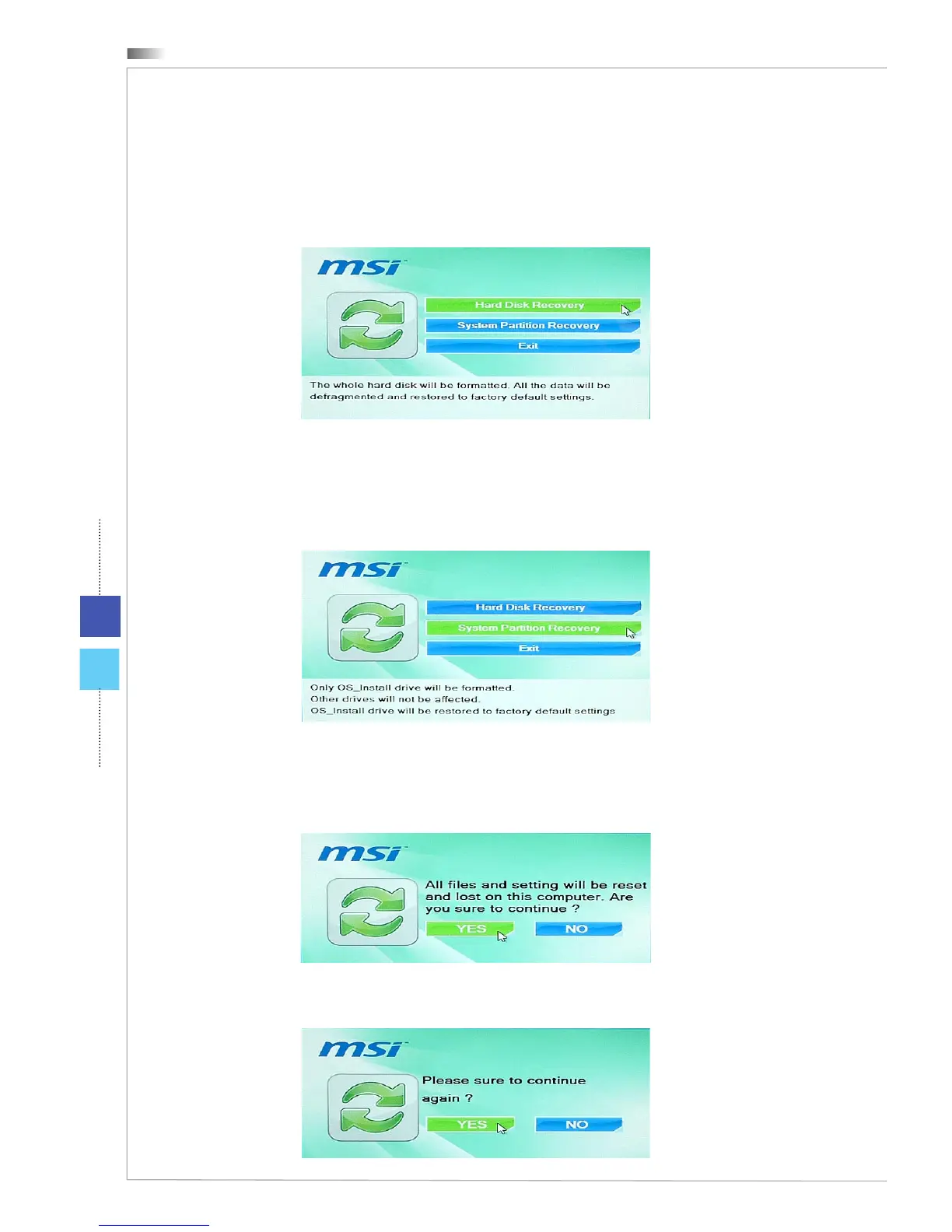
5. The system recovery menu pops up. [Hard Disk Recovery] will format the
whole HDD. All data on the HDD will be erased while all settings will be re-
stored to manufacturer default. Select [Hard Disk Recovery] only when your
HDD is infected with fatal viruses and no solution can be found except a clear
cleanup of the HDD.
[System Partition Recovery] will format the C drive only. Only the C drive will
be restored to manufacturer default. Other drives will not be aected. It is
highly recommended that users select [System Partition Recovery] to restore
the system.
6. The system recovery will format your HDD partition. Make sure that the impor-
tant data have been backed up. Click [YES] to continue; click [NO] to stop the
system recovery.
Click [YES] again to reconrm; click [NO] to stop the system recovery.
7. DO NOT turn o the system power while performing the system recovery func-
tion, or it may cause unknown damage to the system.
8. The following message indicates successful system recovery. Press [OK] to
restart the system and access the Windows operating system as usual.
9. If the recovery process is interrupted or failed, please repeat the recovery
procedures from the beginning.




 To Next Page