Operating Input Calibration
Operating calibration in order of items and
calibration points in Table 10-3:
Table 10-3
Current Measurement Calibration
1) In power-off state, press the keys〔OUTPUT
/ INPUT〕and〔power〕simultaneously to
power on, and release the〔OUTPUT /
INPUT〕key only after the LCD displays all
the contents. The Instrument enters into the
calibration mode, and the symbols ‘CAL 0’
appear in the LCD.
2) Press the 〔OUTPUT / INPUT〕key to
select measurement function , and the LCD
displays ‘INPUT ’,‘mA ’;
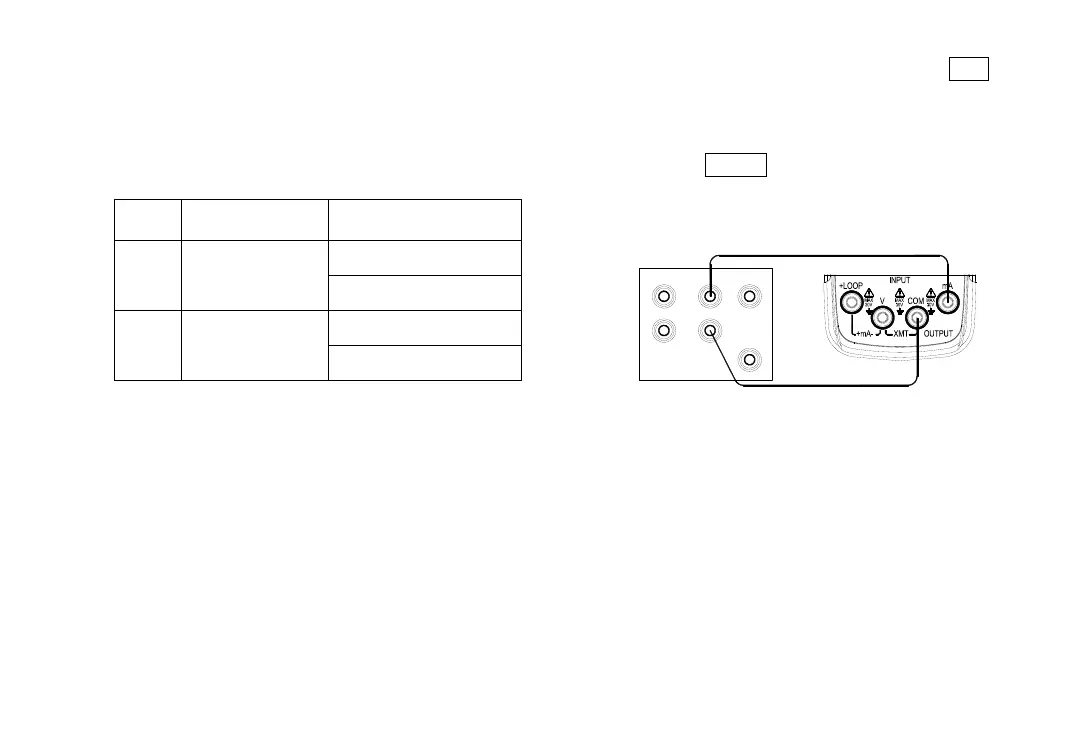
3) Connect to the Instrument as shown in
Figure 10-2;
T R I G
O U T
A U X
S C O P E
Lo
N O R M A L
Hi
S ta nd a r d S o u r c e
( 5 5 2 0 A )
Figure 10-2
4) Set the standard source to an appropriate
range;
5) Set the output of standard source as the
value given in Table 10-3 and when the
output stabilized , press the


 To Next Page