
 Need help?
Do you have a question about the MTX Road thunder and is the answer not in the manual?
Uses a balanced input circuit to minimize induced noise and handle high signal voltages up to 15 volts.
Connect to a component like a crossover, equalizer, or amplifier. Should be inline before a crossover.
Connector for the dash-mounted remote control unit.
Connector for the power supply.
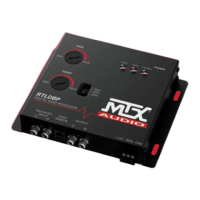
Two knobs (SWEEP and WIDE) control center frequency and filter shape for bass maximization.
Adjustable switch (35Hz, 50Hz, 80Hz) for speaker control and power management.
Three LEDs indicate when the bass maximization circuit is active.
Indicates when the unit is powered on.
Jumpers for selecting balanced or unbalanced input grounding based on system needs.
Jumpers to help resolve alternator whine by providing alternate grounding connections.
Jumpers to adjust bass signal voltage for SPL or tame systems, protecting speakers.
Connect the red wire to the car battery or other power source.
Connect the orange wire to the remote activating (12V DC) wire of the car stereo or equalizer.
Connect the black wire to the car chassis for ground connection.
Connect output RCA connectors to the next component, e.g., crossover, equalizer, or amplifier.
Selects a center frequency (27-63 Hz) to be maximized.
Controls the shape of the filter centered around the SWEEP frequency.
Recreates and injects low frequency information for increased bass impact.
Contours restored bass to match speaker systems.
Allows bass processor control from the driver's seat; LED indicates bass level.
LEDs indicate when the bass maximization circuit is activated.
Fine tunes bass response by filtering unwanted subsonic information.
Maximizes deep bass output while protecting speakers from destructive bursts.
Maximum input/output levels, frequency response, THD, signal-to-noise ratio, input/output impedance.
Power supply type, power draw, and recommended fuse rating.
Check power wire connections, polarity, and fuses if the unit or power LED is not illuminated.
Verify input/output levels and ensure correct crossover settings for system type.
Ensure secure ground connections and proper wire gauge/length; try a different power source.
 General
| Brand | MTX |
|---|---|
| Model | Road thunder |
| Category | Car Stereo System |
| Language | English |



 To Next Page