EasyManua.ls Logo

MTX XTHUNDER - Panel Layouts

MTX XTHUNDER
13 pages
Print Icon
To Next Page IconTo Next Page
To Previous Page IconTo Previous Page
Loading...
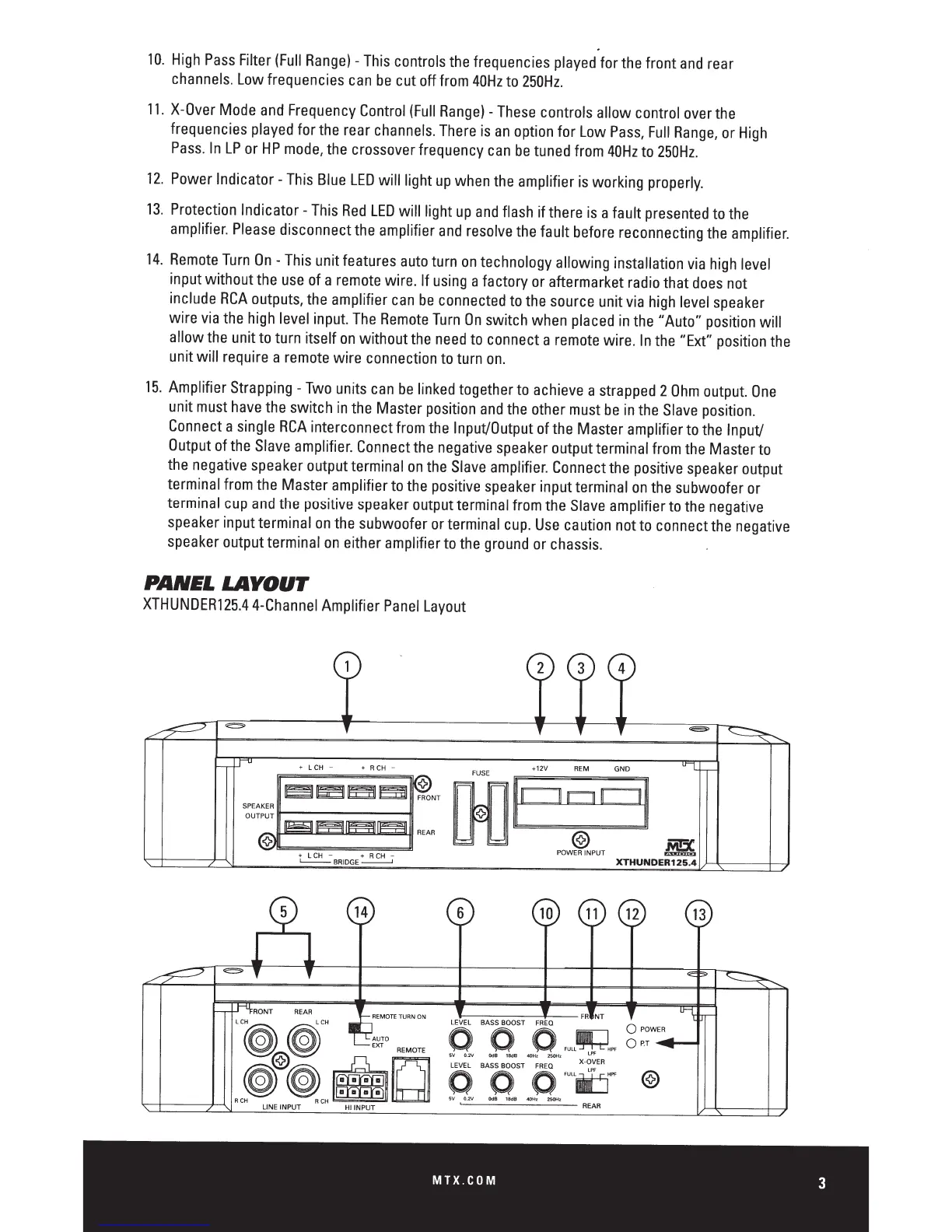
10.
High
Pass
Filter
(Full
Range)-
This
controls
the
frequencies
played
for
the
front
and
rear
channels.
Low
frequencies
can
be
cut off
from
40Hz
to
250Hz.
11.
X-Over
Mode
and
Frequency
Control
(Full
Range)-
These
controls allow control
over
the
frequencies
played
for
the
rear
channels.
There
is
an
option
for
Low
Pass,
Full
Range,
or
High
Pass.
In
LP
or
HP
mode,
the
crossover frequency
can
be
tuned
from
40Hz
to
250Hz.
12.
Power
Indicator-
This
Blue
LED
will light
up
when
the
amplifier
is
working
properly.
13.
Protection Indicator-
This
Red
LED
will light
up
and
flash
if there
is
a fault
presented
to
the
amplifier.
Please
disconnect
the
amplifier
and
resolve
the
fault
before
reconnecting
the
amplifier.
14.
Remote
Turn
On-
This
unit features
auto
turn
on
technology allowing installation
via
high
level
input without
the
use
of
a
remote
wire.
If
using
a factory
or
aftermarket
radio
that
does
not
include
RCA
outputs,
the
amplifier
can
be
connected
to
the
source
unit
via
high
level
speaker
wire
via
the
high
level
input.
The
Remote
Turn
On
switch
when
placed
in
the
"Auto"
position
will
allow
the
unit
to
turn itself
on
without
the
need
to
connect a
remote
wire.
In
the
"Ext"
position
the
unit will
require
a
remote
wire connection
to
turn
on.
15.
Amplifier
Strapping
-Two
units
can
be
linked
together
to
achieve
a
strapped
2
Ohm
output.
One
unit
must
have
the
switch
in
the
Master
position
and
the
other
must
be
in
the
Slave
position.
Connect
a
single
RCA
interconnect
from
the
Input/Output
of
the
Master amplifier
to
the
Input/
Output
of
the
Slave
amplifier.
Connect
the
negative
speaker
output terminal
from
the
Master
to
the
negative
speaker
output terminal
on
the
Slave
amplifier.
Connect
the
positive
speaker
output
terminal
from
the
Master amplifier
to
the
positive
speaker
input terminal
on
the
subwoofer
or
terminal
cup
and
the
positive
speaker
output terminal
from
the
Slave
amplifier
to
the
negative
speaker
input terminal
on
the
subwoofer
or
terminal
cup.
Use
caution
not
to
connect
the
negative
speaker
output terminal
on
either amplifier
to
the
ground
or
chassis.
PANEL
LAYOUT
XTHUNDER125.4
4-Channel
Amplifier
Panel
Layout
2
3
4
+
LCH
-
+
R
CH
-
FUSE
+12V
REM
GND
~~~~
<>
00
FRONT
REAR
@
.M!5C
+ L
CH
- + RCH -
POWER
INPUT
~
L--BRIDGE-
XTHUNDER125.4
6
10
11
12
MTX.COM
3

Related product manuals