IHL_UDARA_2016_11_04_BEGB
25
1
50%
10%
80%
Laag:
Midden:
Hoog:
1
2
3
4
9
5
:
6
Next, select the value that you want to change. The
selected value (for example, 3) will be displayed using
an orange colour. By pressing the keys R (6) or S
(5), you can change the set value.
If you press 1 (4), the changes are automatically
saved and you will exit the menu screen.
6.8.3 Relationship between the air temperature
and air speed, fan curve
10% 20% 30% 40% 50% 60% 70% 80% 90%0%
30°
35°
40°
45°
50°
55°
60°
25°
1
2
3
4 5 6
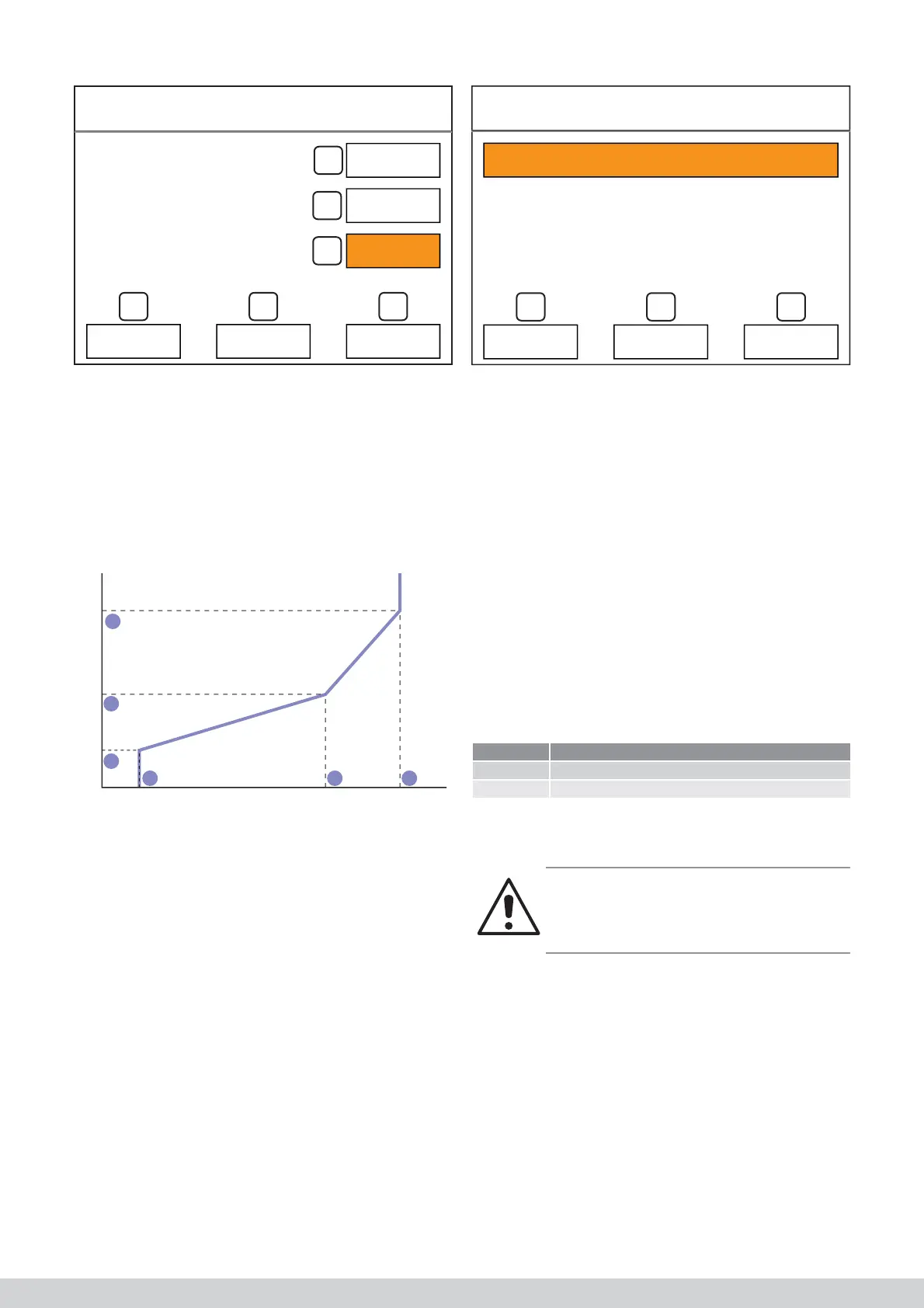
The relationship between the air temperature and
air speed is displayed in the above graph. If the air
temperature is lower than the “low value” (3)
parameter, the fan is operational at the “low” (4) speed.
If the air temperature is higher than the “high value”
(1) parameter, the fan is operational at the “high” (6)
speed. In-between these values, the speed of the fan
is automatically adjusted based on the air temperature.
The “average value” (5) and “average” (2) parameters
serve as an additional checking point to ensure you
have more control over the air fl ow rate.
6.8.4 Setting the language
The control can be set to different languages. To
access this setting, press the “system” (1) button in the
setting menu and, next, the third option: Language.
1
Nederlands
Taal
4
9
5
:
6
Vervolgens kan u met knop - (5) of (+) de gewenste
taal instellen.
6.8.5 Tijd en datum instellen
Op gelijkaardige wijze is het mogelijk tijd en datum in
te stellen (niet van toepassing bij gebruik van de RC21
thermostaat).
6.8.6 Schermreiniging
Door op de toets schermreiniging te drukken wordt het
aanraakscherm tijdelijk uitgeschakeld voor reiniging.
Reinig het scherm met een microvezeldoek of met een
papieren zakdoek.
6.8.7 Installateursmenu
Certains paramètres sont dans un menu réservé aux
installateurs Bepaalde parameters zitten in een instal-
lateursmenu om ondoordacht wijzigen tegen te gaan.
Dit installateursmenu is enke
Installateurcodes
Code Gebruikersniveau
123456 Power user
007007 Installateur
Le code du niveau d’utilisation <<technicien>> n’est
pas dévoilé qu’àprès avoir suivi une information chez
Multicalor.”
Avertissement!
Modifi er sans discernement des paramètres réser-
vés aux installateurs peut endommager l’appareil
ou faire en sorte qu’il ne fonctionne plus convena-
blement.
Dans des circonstances normales, il n’est pas néces-
saire de procéder à des modifi cations dans ce menu.
6.8.8 Écrans d’information
Appuyer sur le bouton info dans le menu principal vous
permet de lire une série de paramètres. Les informati-
ons de ces écrans peuvent uniquement être lues, ces
paramètres ne peuvent pas être modifi és. Ces écrans
ne contiennent pour l’instant que le numéro de version
du logiciel de commande
Air fl ow (CH)
1
Nederlands
Taal
4
9
5
:
6
Next, you can set the required language with the R (6)
or S (5).
6.8.5 Setting the time and date
The time and date can be set similarly (not applicable
when using the RC21 thermostat).
6.8.6 Screen cleaning
The touch screen can be temporarily switched off for
cleaning by pressing the clean screen button. Clean
the screen using a microfi bre cloth or with a paper
tissue.
6.8.7 Installer’s menu
Specifi c parameters can be found on an installer’s
menu to stop thoughtless changes. This installer’s
menu can only be accessed if a password (a code) is
entered.
Installer code
Code User level
123456 Power user
007007 Installer
The code for the “engineer” user level is only released
after following training at Multicalor.
Warning!
Improper changes of the installer parameters can
lead to damage to the appliance or that it no longer
works as it should.
Changes do not normally have to be implemented in
this menu.
6.8.8 Information screens
A number of parameters can be read by pressing the
information button on the main menu. The information
in these screen can only be read. The parameters
cannot be changed. Provisionally, these screens only
contain the version number of the operating software.
Language
Low:
Medium:
High:
English



 To Next Page