19info@multisound.it
GB
Et – DISABLE TIMER
The timer can be disabled at any time even when waiting for the device to
start or during playing.
1. Turn on the display by pressing any button. Press the select (SEL) and
set (SET) buttons at the same time for at least 2 seconds. The player will
automatically enter the enable timer Et menu.
2. Press the button and input the value 0.
3. Press the set (SET) button to conrm. The device will immediately begin
functioning normally and the timer will be disabled.
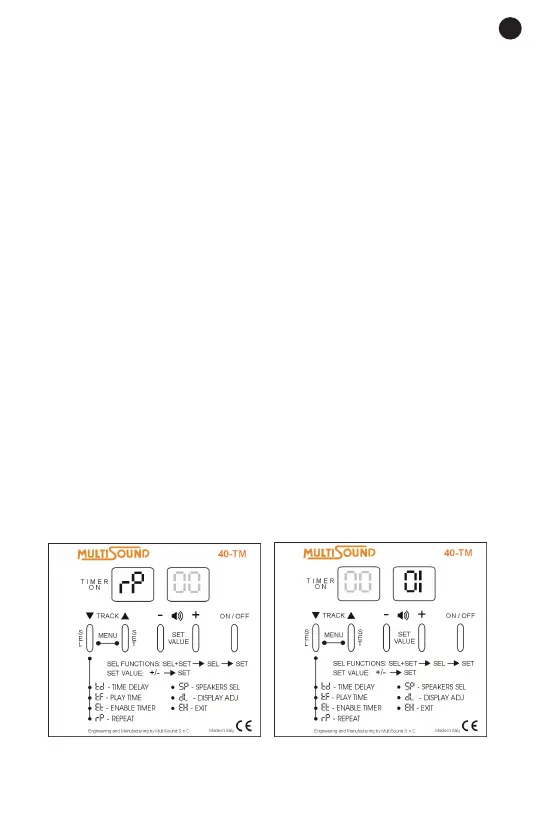
rP – REPEAT
To repeat the same on/off cycle at the same time, enable this function and
set the value on the display to .1,The player will repeat the cycle every day
as long as it has power.
1. Press the select (SEL) and set (SET) buttons at the same time for at
least 2 seconds to enter the SETTINGS MENU.
2. Press the select (SEL) button repeatedly until the repeat rP .
symbol appears on the display.
3. Press the set (SET) button. Input the value “1” to enable the repeat cycle.
Input the value 0 to disable the repeat cycle.
4. Press the set (SET) button to conrm.
5. To exit the menu, press the select (SEL) button repeatedly until the exit
EH. symbol appears on the display. Press the set (SET) button to conrm
or wait until the device returns automatically to the track that was playing
after 10 seconds.



 To Next Page