20 www.multisound.it
GB
GENERAL SETTINGS
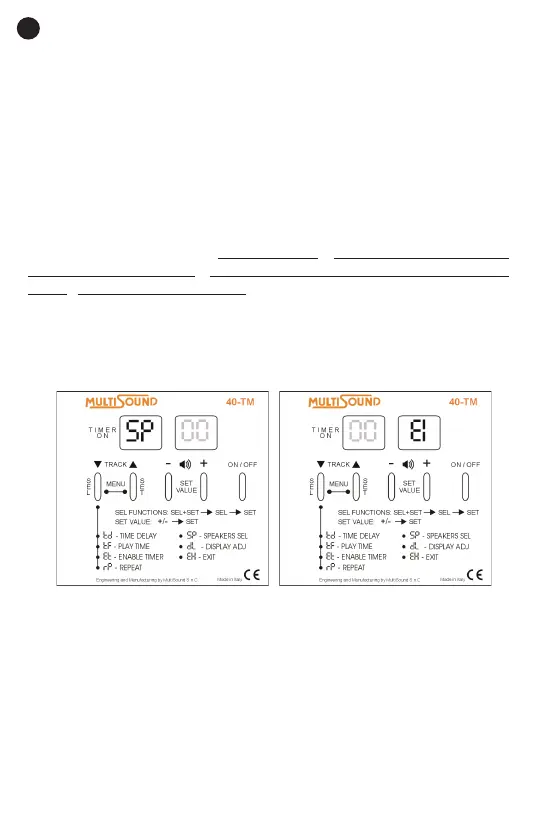
SP – SELECT SPEAKERS
While playing songs, use this menu to select and enable speakers. The three
options are: only the internal speaker, only an external speaker or both spea-
kers at the same time.
1. Press the select (SEL) and set (SET) buttons at the same time for at least 2
seconds to enter the SETTINGS MENU.
2. Press the select (SEL) button repeatedly until the select speakers SP.
symbol appears on the display.
3. Press the set (SET) button. Input the value I to enable the internal spe-
aker only. Input the value E to enable the external speaker only. Input the
value EI to enable both speakers.
4. Press the set (SET) button to conrm.
5. To exit the menu, press the select (SEL) button repeatedly until the exit EH
symbol appears on the display. Press the set (SET) button to conrm or wait
until the device returns automatically to the track that was playing after 10
seconds.
dL – ADJUST DISPLAY LIGHT
Use this setting to change the brightness of the display light from a minimum
level of 1 to a maximum level of 9.
1. Press the select (SEL) and set (SET) buttons at the same time for at least 2
seconds to enter the SETTINGS MENU.
2. Press the select (SEL) button repeatedly until the display light dL. symbol
appears on the display.
3. Press the set (SET) button. Use the plus/minus (+/-) buttons to input the
desired value from 1 to 9.
4. Press the set (SET) button to conrm.



 To Next Page