EasyManua.ls Logo

MULTISPAN MMC-1046T - User Manual

MULTISPAN MMC-1046T
4 pages
To Next Page IconTo Next Page
Loading...
www.multispanindia.com
Page - 4
MMC-1046T
Product improvement and upgrade is a constant procedure. So for more updated operating information and support,
Please contact our helpline : +91-9978991474/76/82 or Email at service@multispanindia.com Ver: 1901
Note:
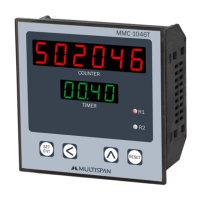
UPPER:- 6 Digit 7 seg 0.56”,red LED Display
LOWER:- 4 Digit 7 seg 0.4”,green LED Display
NPN Proxy, NPN Color mark sensor (CMS),
Micro switch
0 To 99.99 Second
Output
Power Supply
Operating
Temperature
Relative
Humidity
100 to 270V AC,50/60 Hz, Approx 4VA
0°C To 55°C
Up to 95% RH Non Condition
Model
Display
Size (mm)
Panel Cutout
Range
Input
96 (H) X 96 (W) X 50 (D) mm
92 X 92 mm
MMC-1046T
1Relay, 1C/O 230V AC
IP-65 (Front side) As per IS/IEC 60529 : 2001
Protection
Level
www.multispanindia.com
Page - 1
MMC-1046T
OPERATING MANUAL
PROGRAMABLE COUNTER
MMC-1046T
Technical Specification
Working
RESET
1. Make all connection properly according to the “Connection Diagram”. Then ON the
instrument, set the “Set Time” according to your requirement press key
to store new value in memory.
2. When a pulse Input is given to NPN Proximity sensor, than Upper Display will increase
Counts & Timing will start in Lower Display. Between running time if Pulse of CMS is
given than timing will stop. At the end of Timing Relay will turn Off.
3. If you don’t press any key for 5 seconds, the previous value of set point is retained and
the instrument goes in to run mode.
4. Press to store set value in memory, simultaneously instrument goes in run mode.
only after Press key the new value is stored.
5. If you want to reset your instrument Press key.
Question and Answer IconNeed help?

Do you have a question about the MULTISPAN MMC-1046T and is the answer not in the manual?

MULTISPAN MMC-1046T Specifications

General IconGeneral
Input Voltage24 VDC
Frequency50/60 Hz
Storage Temperature-20°C to 70°C
DisplayLCD
CertificationsCE, UL
TypeProgrammable Logic Controller
Operating Temperature0°C to 55°C
Communication InterfaceRS-485

Summary

Technical Specifications

Display Specifications

Details the dual LED displays: Upper 6-digit 7-seg red, Lower 4-digit 7-seg green.

Physical and Electrical Specifications

Covers dimensions, panel cutout, input/output types, power supply, and protection level.

Operating Environment

Specifies the acceptable operating temperature and relative humidity ranges.

Working and Operation

Initial Setup and Operation

Instructions for connecting the instrument, setting time, and storing values.

Counting and Timing Functionality

Explains how the counter increments and timer functions upon receiving input pulses.

Instrument Reset

Procedure for resetting the instrument to its default or previous state.

Key Operation and Configuration

Basic Key Functions

Describes how to navigate digits and increase their values using the instrument keys.

Basic Configuration Flow

Illustrates the steps for initial setup, including power on and saving settings.

Connection Diagram

Wiring Terminal Layout

Visual representation of terminal connections for input, output, and power.

Safety and Installation Guidelines

General Safety and Warnings

Important safety precautions, including electrical shock risks and interference reduction.

Mechanical Installation

Instructions for panel cutout, fitting the unit, and environmental considerations.

Maintenance Procedures

Guidelines for cleaning the instrument and handling fusible resistors.

Related product manuals