www.multispanindia.com
Page - 2
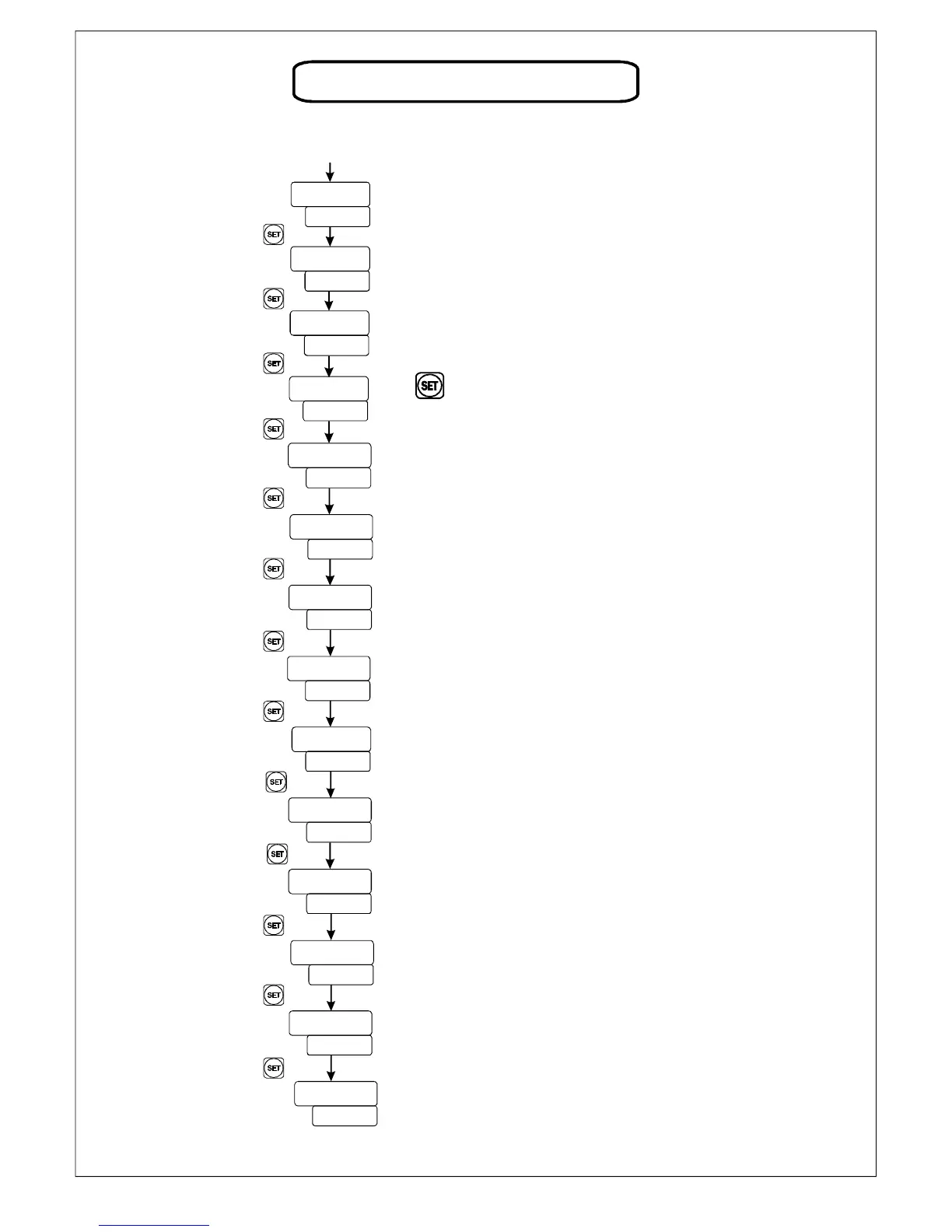
USER CONFIGURATION
Set Value
Set Point 1
Set Point 2
Input Selection
0-10V DC/4-20mA DC/0-20 mA DC
Press key for 3 sec to
enter Password parameter
Process Value
Power ON
Hystersis-1 For set point-1
Range: 0 To 1000
Range: 0 To 1000
Hystersis-2 For set point-2
Mode-1
Mode-2
Decimal Point
Range: 00.00/0.000/0000
Low Range
High Range
Range: -999 TO 9999
Range: -999 TO 9999
Range: 1 To 10 Second
High Alarm,Low Alarm,Inband,Outband,
Absoult Low, Absoult outband Alarm For 1 relay
High Alarm,Low Alarm,Inband,Outband,
Absoult Low, Absoult outband Alarm For 2 relay
.
Filter Time
Off-Set
st
nd
Range : -100 To +100 Count
Press key
Press key
Press key
Press key
Press key
Press key
Press key
Press key
Press key
Press key
Press key
Press key
Press key



 To Next Page