SETTING UP AND CONFIGURING THE DEVICE
Conduit
®
Cat 4 for North America MTCDT-L4N1 Hardware Guide 21
1. Purchase a USB to 3.3V Serial UART cable with a USB-A connector for the host end and three leads on
the device end. See cable information for details.
2. Purchase a 3-pin connector using crimp-style contacts for the device end of the cable. See connector
information for details.
3. Cut the original connectors off the three leads of the device end of the cable.
4. Strip the insulation and crimp the terminals on the wire with a custom crimping tool.
5. Plug the terminals into the connector shell. Note: The terminals are very small.
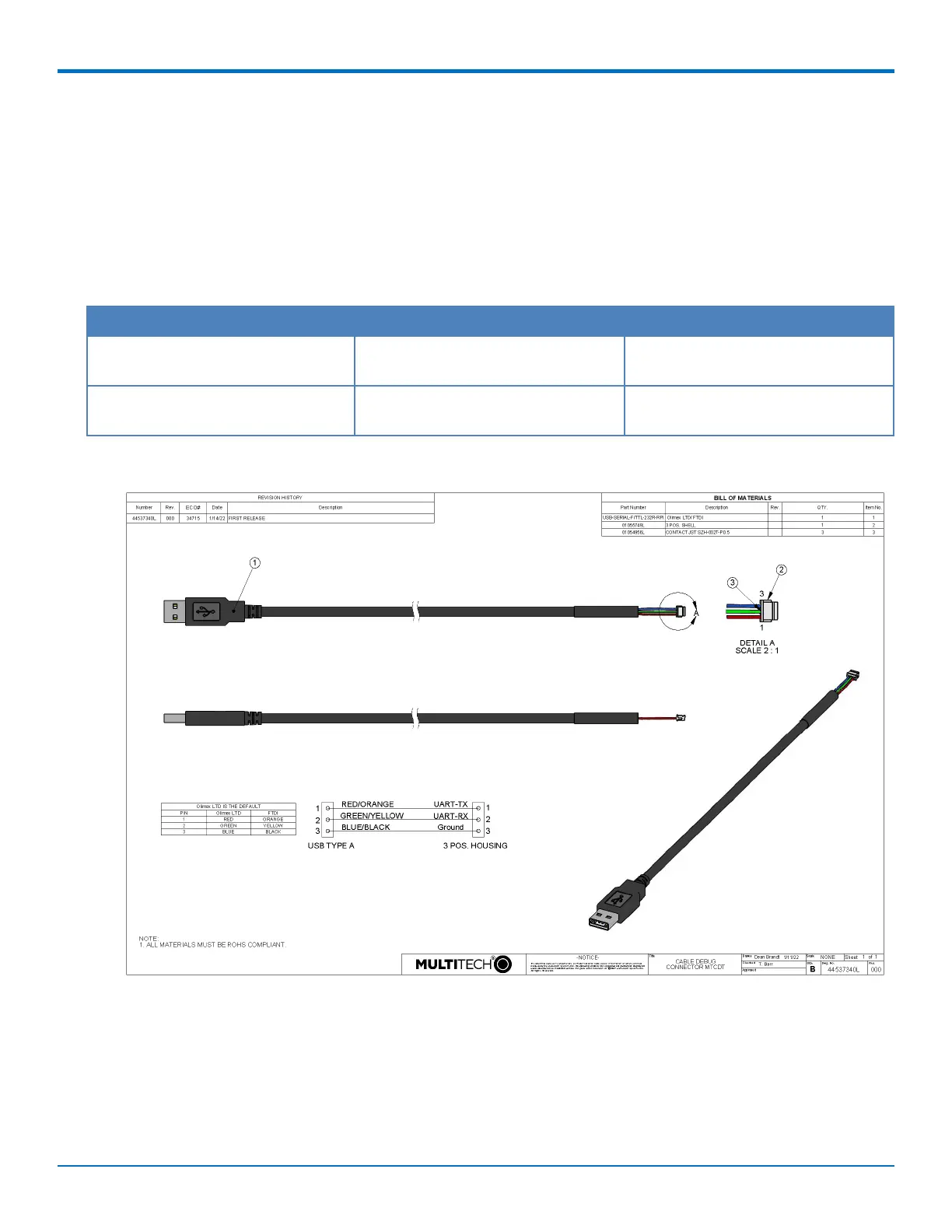
Cable Information
Description Manufacturer P/N or Product Number
Olinuxino Serial Console Cable (USB
to 3.3V Serial UART cable)
Olimex LTD USB-SERIAL-F
Debug Cable for Raspberry Pi (USB
to 3.3V Serial UART cable)
FTDI TTL-232R-RPi
Cable Drawing


 To Next Page