PSG/10443/1
RPR 550IS Series
TM1188 Issue 1 Page 5 - 5
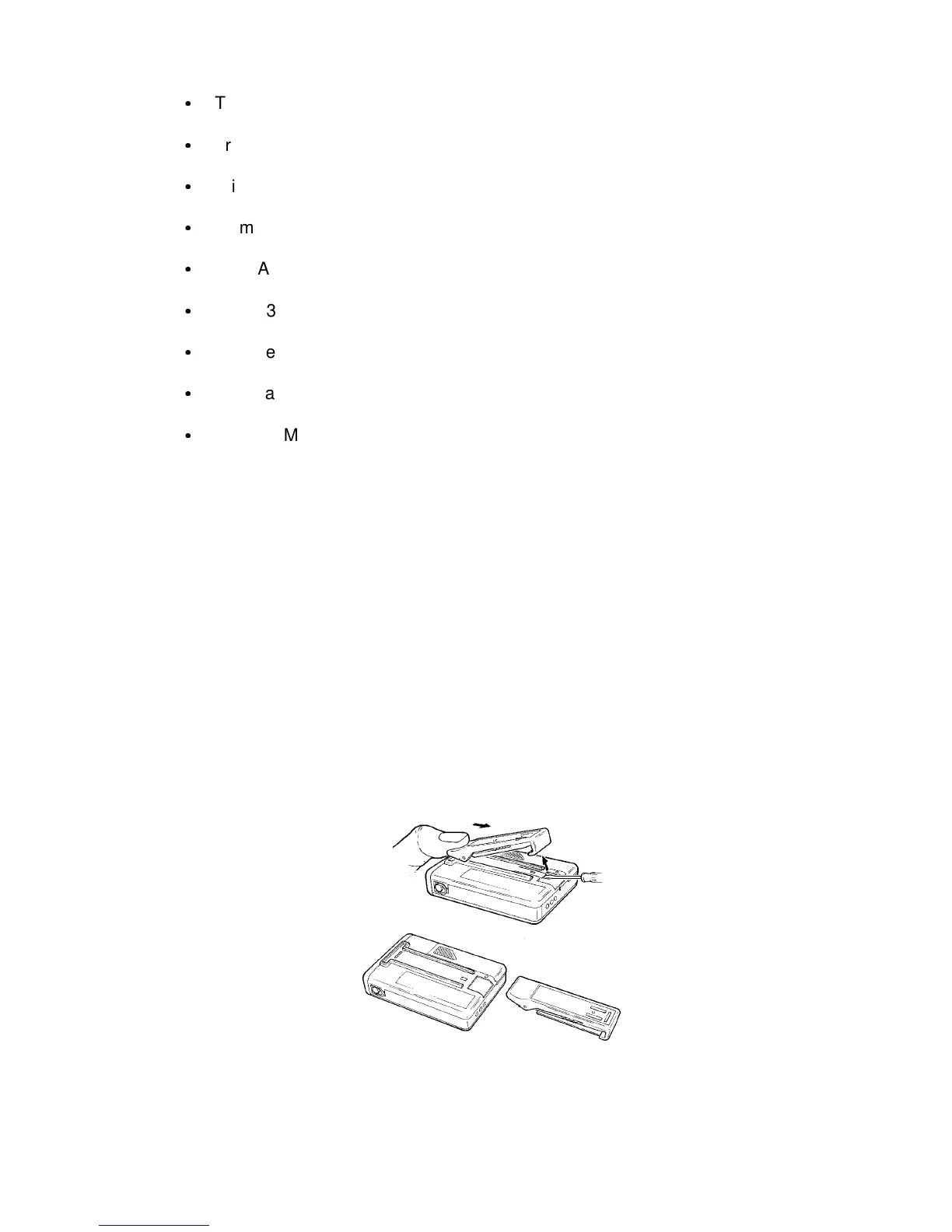
Figure 1: Clip Removal
&
Trimming Tools (RPR 551IS), Tip Sizes 0.4 x 0.9mm (L101), 0.4 x 1.8mm (C121, L2)
&
Trimming Tools (RPR 552IS), Tip Sizes 0.4 x 1.8mm (C202, C209, C212, RV1, L2)
&
Trimming Tools (RPR 553IS), Tip Sizes 0.4 x 1.8mm (C314, C327, RV1, L2)
&
2.5mm Crosspoint Screwdriver
&
4mm A/F Spanner/Socket
&
RPR 530 Case and Speaker Removal Tool (Part No. 0861-0344)
&
Surface Mount Handling Tools
&
Anti-static Workstation (Part No. 0160-7888)
&
Lacquer Multicore PC52 (Part No. 9411-0001)
SERVICING
9. Switch the pager off before dismantling it.
Clip Removal and Replacement
10. To remove and replace the clip (see Figure 1) proceed as follows:
a) Using a screwdriver, lift the retaining catch of the metal back plate of the clip. At the
same time, slide the clip out of the housing by applying thumb pressure to the clip
top.
b) To replace the clip, insert the top of the metal back plate into the clip housing. Push
the clip home until the retaining catch locks into position.



 To Next Page