MEK-18-S / MAK-18-S Issue 03.2011/Rev. 03 Page 13/20
Set/operate temperature controller (1) - Function/description of
LEDs
LED
GREEN
LED
RED
Operating mode
FLASHES
OFF
Heating element is being checked.
FLASHES
FLASHES
Temperature setting on temperature controller (1) is below the
minimum temperature, controller position approx. 20 (2). The drive
is blocked – cold start protection.
ON
FLASHES
Temperature setting on temperature controller (1) is above the
minimum temperature. On the minimum temperature being
reached, a timer is activated.
Preheat time: 10 minutes.
ON
OFF
Ready for operation: timer has timed out,
drive has been released for operation.
OFF
FLASHES
Air failure: Allow machine to cool, pull mains connector, plug in
mains connector and heat up to just above the minimum
temperature, i.e. approx. position 30 (3).
On a renewed air failure, check the heating element and replace,
if necessary.
For MEK hand extruders, check the air rate and reduce, if
necessary.
OFF
ON
Current draw too high.
RESET by pressing the controller switch.
Check air temperature; if necessary, select a higher temperature
and/or speed on the drive.
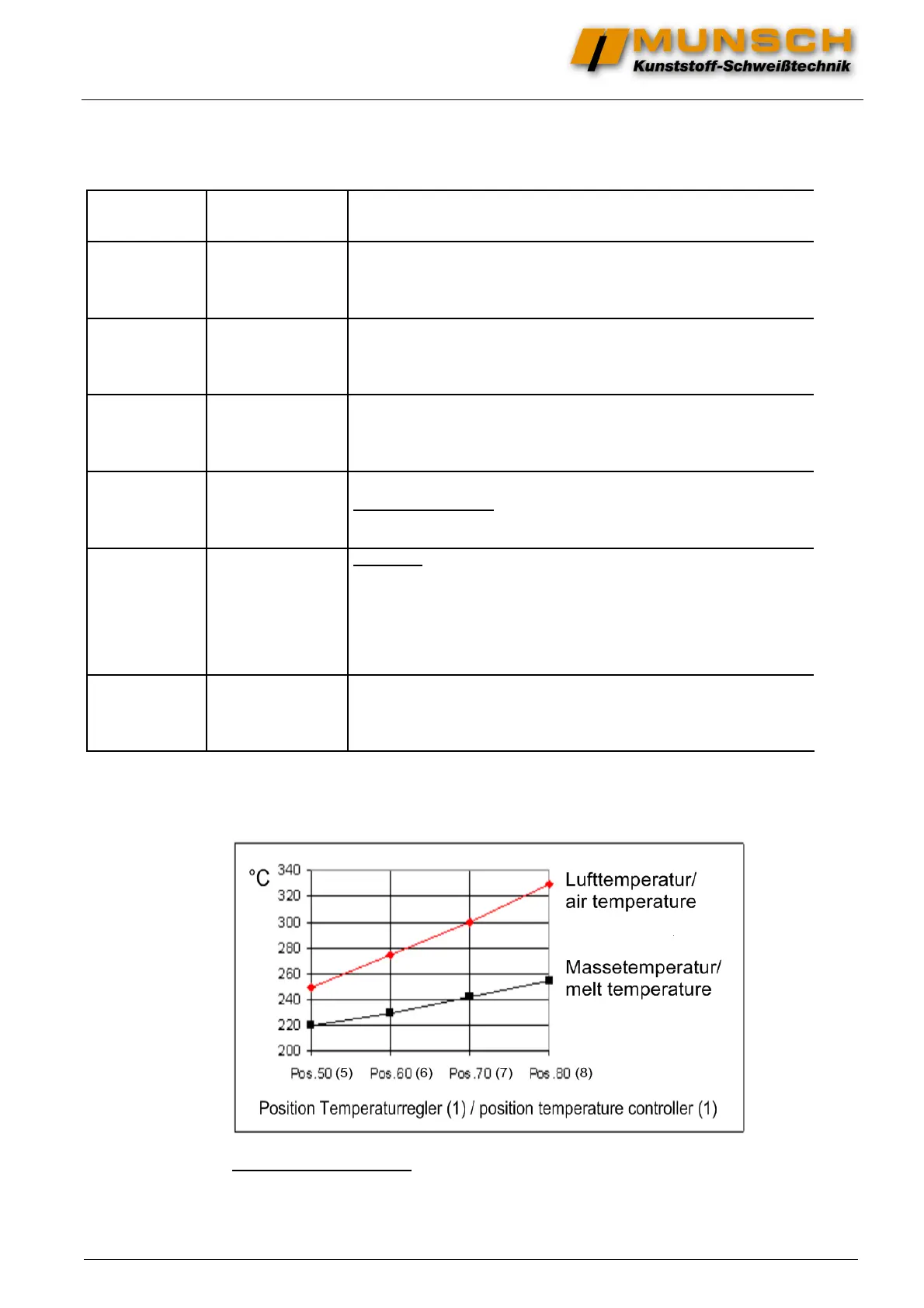
Guide values for air temperature / melt temperature
Check temperatures on the running extruder
with an external thermometer after about 5 minutes.
Prior to prolonged work interruptions (approx. 15-30 minutes), set the temperature controller (1) back by about 2
positions (risk of melt overheating in the melt chamber). Set temperature controller to welding position approx. 5
minutes before restarting the machine.


 To Next Page