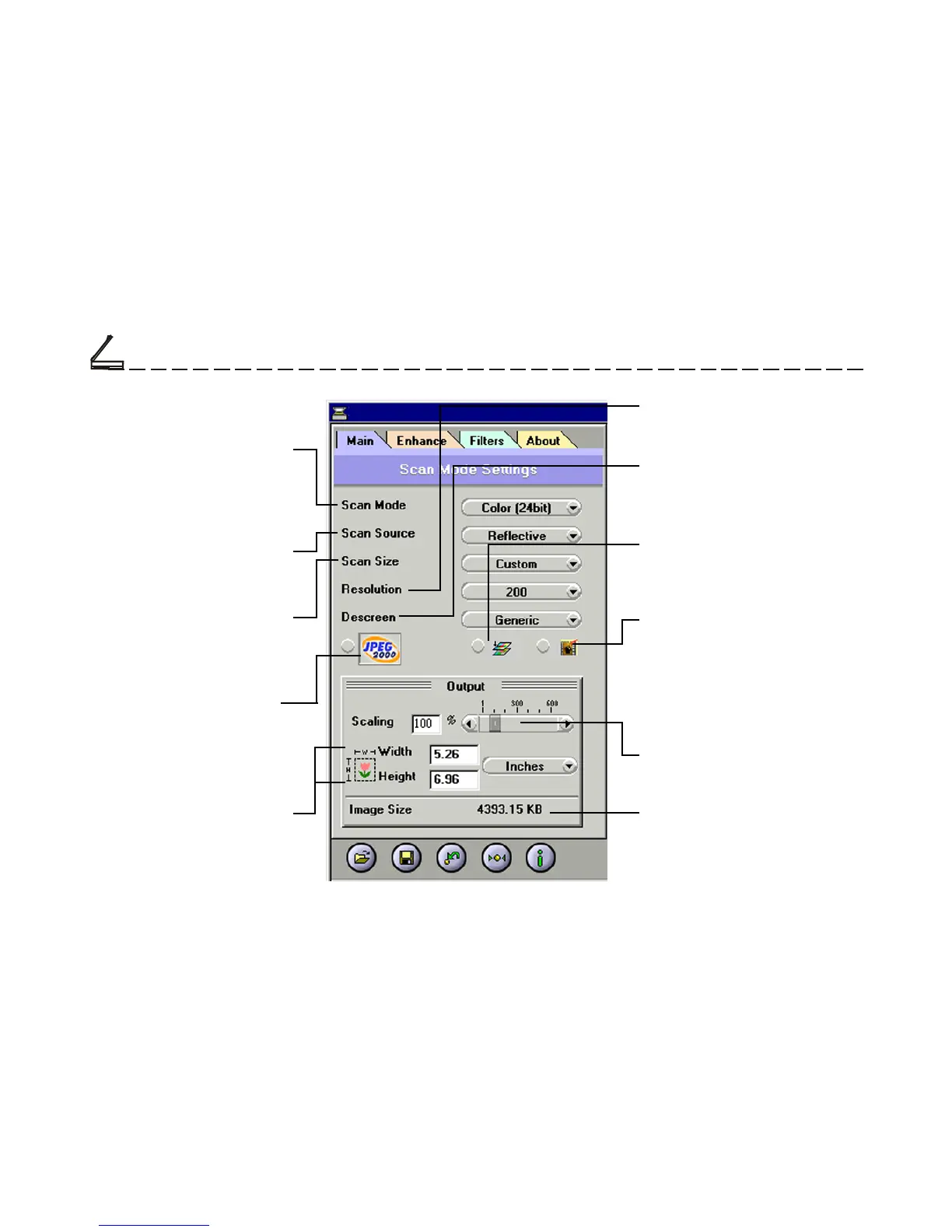
Resolution
Sets the resolution in dots per inch
(dpi).
Output Scaling
Changes the dimensions of the
final output.
Scan Source
Sets the media type of the
document to be scanned.
Scan Mode
Determines how the scanner
will read the image and refers
to how the image will be
reproduced after it is scanned.
Photo Refresh
Photo Refresh allows you to auto-
matically lighten and sharpen the
scanned image by clicking on its
icon. This function is applicable
when you are scanning images in
Color 24bit.
Descreen
Sets the media type of the document
to be scanned to reduce image
noise.
Image Size
Displays the amount of computer
space needed to display or save the
selected image area.
Scan Size
Refers to the size of the im-
age or document that you are
about to scan.
JPEG2000 Scan
The latest image compression
standard that usually provides
smaller file size and higher
image quality than the original
JPEG.
Width and Length
Show the dimensions of the
image area inside the Crop
Frame.
Color Matching Control
Color Matching allows the scanner
to more accurately reflect the actual
colors of the original image.
The Main Folder



 To Next Page