12
3. CONNECTING THE CUFF TO THE MONITOR
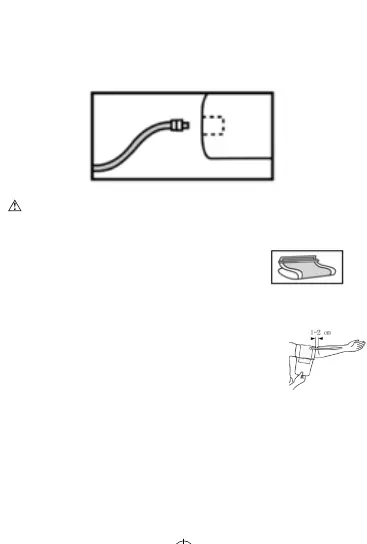
Insertthecutubingconnectorintothesocketonthelesideofthe
monitor.Ensurethattheconnectoriscompletelyinsertedtoavoidair
leakageduringbloodpressuremeasurements.
Avoidcompressionorrestriconoftheconnecontubingduring
measurement,whichmaycauseinaonerror,orharmfulinjurydueto
connuouscupressure.
4. APPLYING THE CUFF
a. Pullingthecuendthroughthemetalloop
(thecuispackagedlikethisalready),turnitoutward
(awayfromyourbody)andghtenitandclosetheVelcrofastener.
b. Placethecuaroundabarearm1-2cmabovetheelbowjoint.
c. Whileseated,placepalmupsideinfrontofyou
onaatsurfacesuchasadeskortable.
Posiontheairtubeinthemiddleofyourarm
inlinewithyourmiddlenger.
d. Thecushouldtcomfortably,yetsnuglyaroundyourarm.You
shouldbeabletoinsertonengerbetweenyourarmandthecu.
Note:
• Pleaserefertothecucircumferencerangein“SPECIFICATIONS”
tomakesurethattheappropriatecuisused.
• Measureonthesamearmeachme.
MX86005 - IFU - 11.2020.indd 12MX86005 - IFU - 11.2020.indd 12 2020/12/14 16:372020/12/14 16:37


 To Next Page