Indicator
Temperature
International
symbol
SYNTHETIC
Low temperature
WOOL / SILK
Medium
temperature
COTTON
High temperature
Synthetics, nylon,
acrylic, acetate
Cotton, rayon,
thread, linen
Cotton, rayon,
thread, linen
Dry ironing, on
the back of the
garment
Use a cloth and
iron on the back
of the garment
Iron while the
garment is still
wet
Iron while the
garment is still
wet
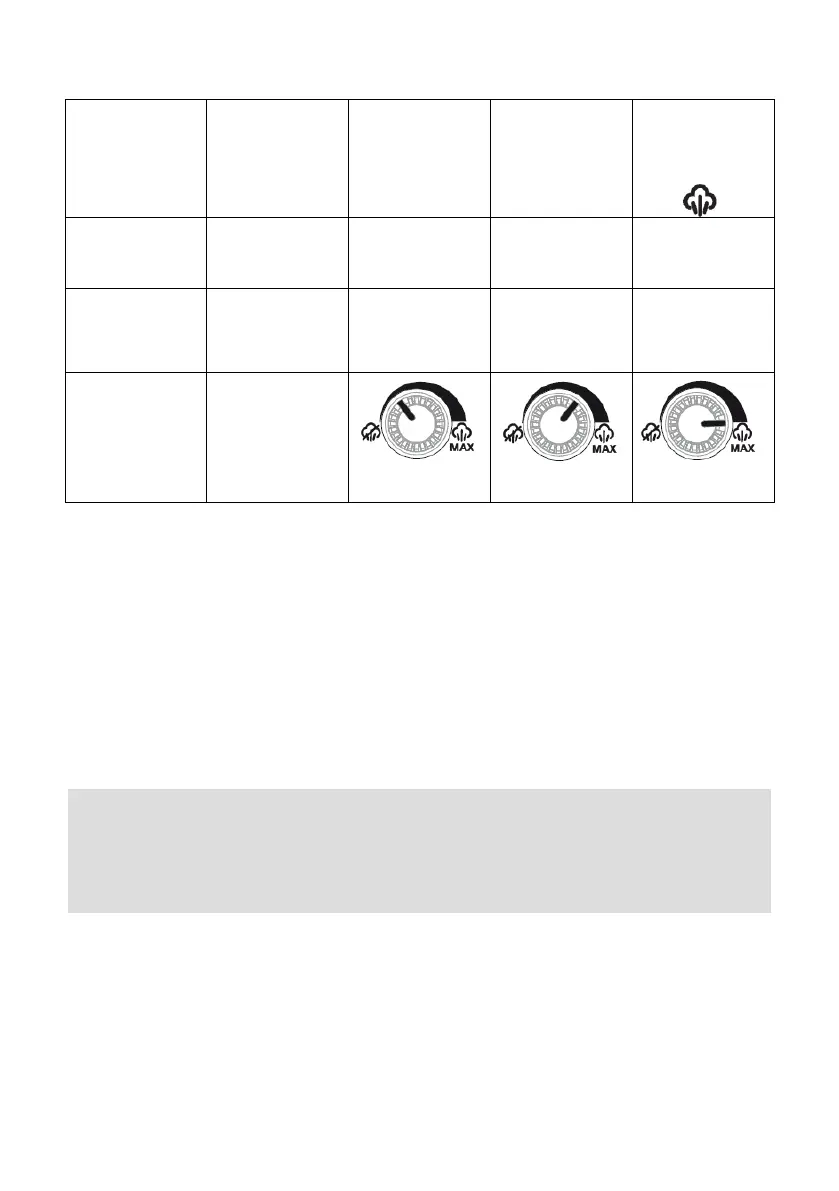
Before proceeding to iron, we recommend you classify the garments according
to the type of fabric (synthetic, silk, wool, cotton, linen, etc.) and so, you can
select the appropriate temperature for each of them.
It is quite common, that the labels that incorporate the garments include the
international symbol of ironing temperature.
It is recommended that you start your ironing session with those garments
whose fabrics require lower temperature (nylon, acrylics, synthetics, etc.) and
finish with the most resistant (linen, denim clothes, etc.). In this way you will
save time and electricity. Keep in mind that your iron takes less time to warm
up than to cool down.
Note:
If the garment to be ironed is composed of the mixture of two or more fabrics
(for example, 60% polyester and 40% cotton), you must choose the
temperature corresponding to the most sensitive fiber, in the case of the
example choose the average temperature WOOL SILK.
If you do not know the material with which the garment you want to iron is
made, first try it in a non visible place to obtain the proper ironing temperature.
CONTROL PANEL
The operating indicator of the water pump, the steam flow regulator and the
general on / off switch are located on the control panel.


 To Next Page