PROBLEM SOLVING
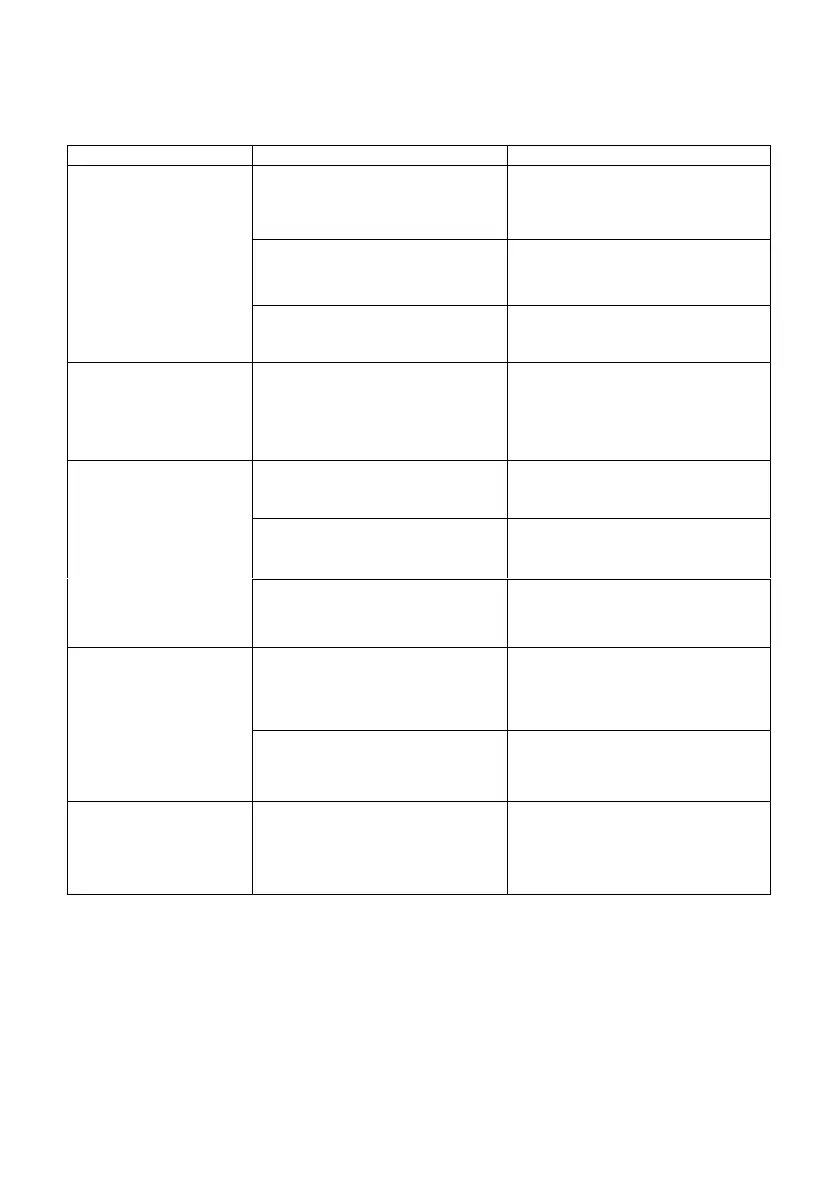
The ironing center has no power
Plug the appliance into the mains
and turn on the ironing center by
means of the general on / off
switch 14.
The selected temperature is very
low or is at a minimum
Turn the temperature selector 7
and choose the desired
temperature
Malfunctioning, different from that
described in the instruction
manual
Contact the nearest MX ONDA
Official Technical Service
When the appliance is
turned on for the first
time, there is a slight
smoke accompanied by
odor
During the different
manufacturing processes some
parts of the plate have been
lightly greased
This is normal and will disappear
shortly after its use
The steam station does
not produce steam
The anti-lime filter is not placed in
the water tank
Insert the anti-lime filter
Fill the water tank and press the
steam button for at least 30
seconds
The selected temperature is low,
temperature selector in the
"SYNTHETIC" position
Select a higher temperature, see
the ironing guide
Water droplets come
out of the steam outlet
holes of the iron
The selected temperature is not
suitable for the type of fabric and
the sole of the iron cools slightly
Select the appropriate temperature
according to the ironing guide
table
The sole of the iron has not
reached the proper operating
temperature
Wait until the temperature indicator
light goes off at least a couple of
times
The temperature
indicator light does not
come on regardless of
the position of the
temperature selector
The protection device has
operated, due to overheating or
due to a possible fault.
Unplug the steam station, wait 30
minutes and plug it back in again.
If the anomaly persists, consult an
Official Technical Service MX
ONDA


 To Next Page